
Free Android app
Message Alarm: a loud alarm for the messages you can't miss
Message Alarm is a free Android app that rings a loud alarm, even when your phone is on silent, when an important message arrives from a person or with a word you choose.
It also keeps a notification history, shows deleted messages, cleans up your notification bar and tracks spending, all on your phone.
- Free
- 100K+ downloads on Google Play
- 21 languages
- No ads
- Messages stay on your phone
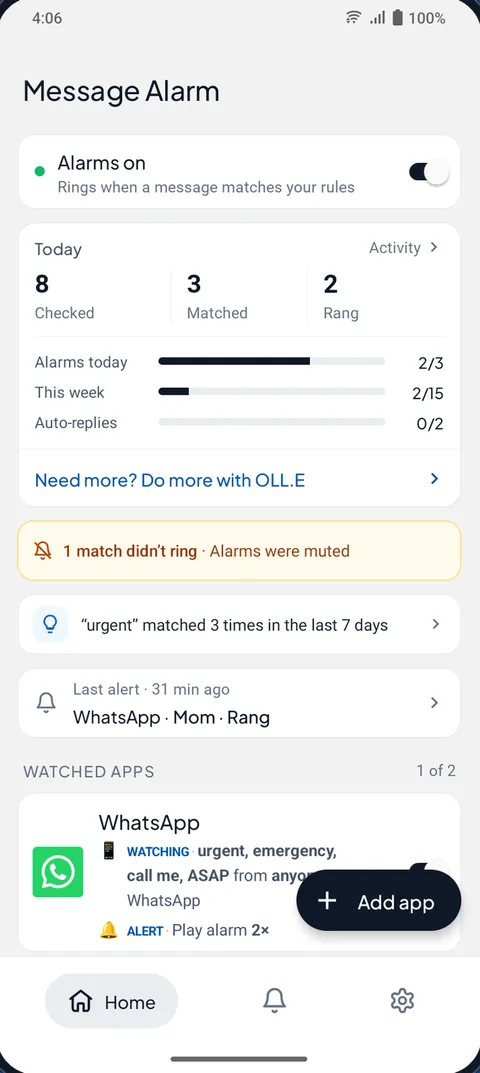
- Rings on silentPlays on the alarm sound, so silent and vibrate don't mute it, and it rings through Do Not Disturb while alarms are allowed.
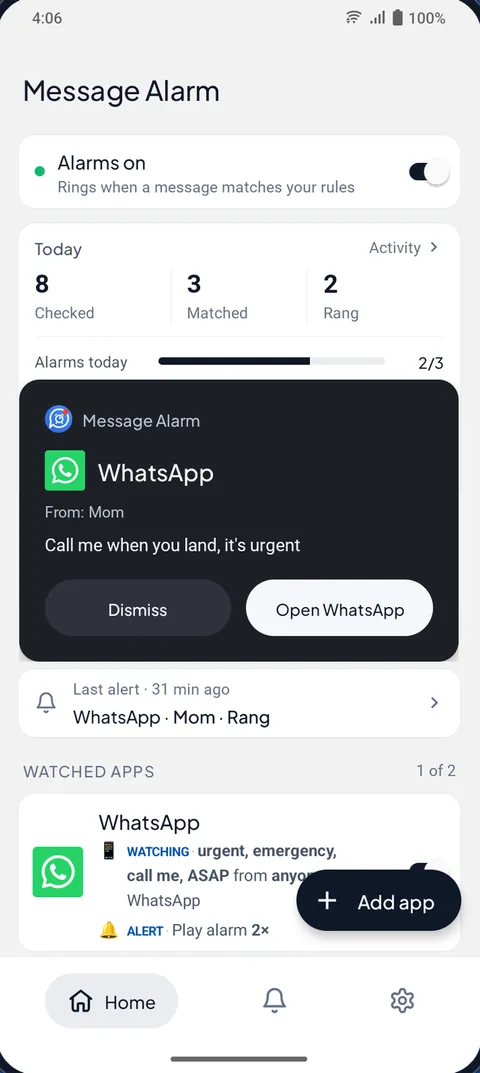
- Full-screen alarm cardThe sender and the message on screen, with Dismiss and Open. Up to 10 rings, vibration and flash.
- Only what you chooseThe people and words you pick, during the hours you pick. Everything else stays quiet.
An alarm for important messages, even on silent
Pick an app, then say who and what matters: a person, a word like "urgent" or "call me", and the hours. When a message matches, Message Alarm turns the screen on and rings at the volume you set, even when the phone is on silent.
- Only alarm for, or never alarm for, the names you type
- Words in any language, matched on your phone
- Only during set hours, every day, once, or on the days you pick
- Your own tone, 1 to 10 rings, vibration, flashlight
- An optional automatic reply to the sender, so they know you saw it
Guides: an SMS alarm on Android · keyword alerts · ring on silent for certain contacts
Smart Tray: a clean notification bar
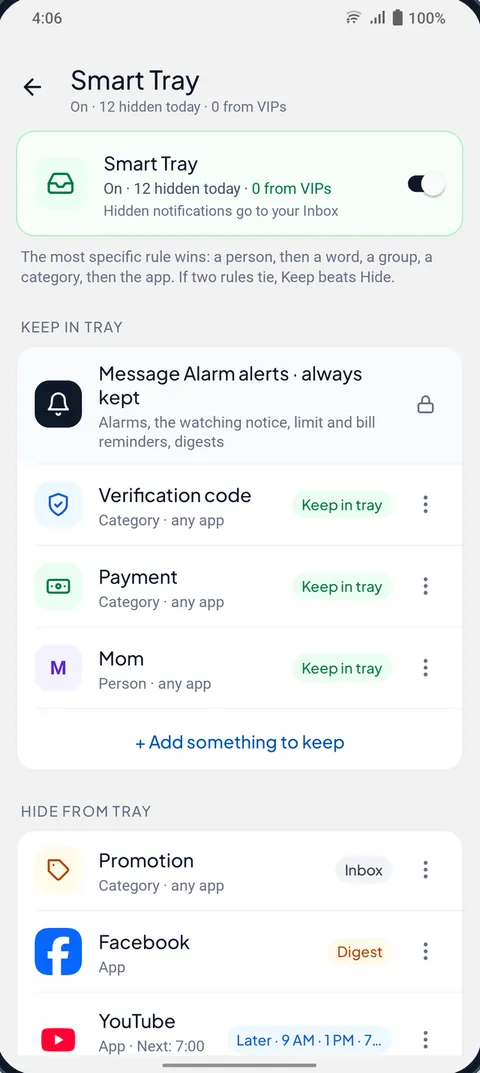
Smart Tray keeps only the notifications you choose in your notification bar and moves the rest to an Inbox in Message Alarm, so nothing is lost. Keep codes, payments and the people who matter. Send offers to the Inbox, busy apps to a digest at 9, 1 and 7, and busy groups to "only @mentions".
- Keep in tray
- Inbox
- Later · 9 AM
- Digest
Set it up in about 60 seconds from your own last 7 days, try it for a day without hiding anything, and get suggestions learned on your phone. Quiet mode then makes the phone really silent, and alerts only what you keep. Alarms always ring.
Guides: clean your notification bar · a notification digest · Quiet mode and Do Not Disturb
See deleted messages
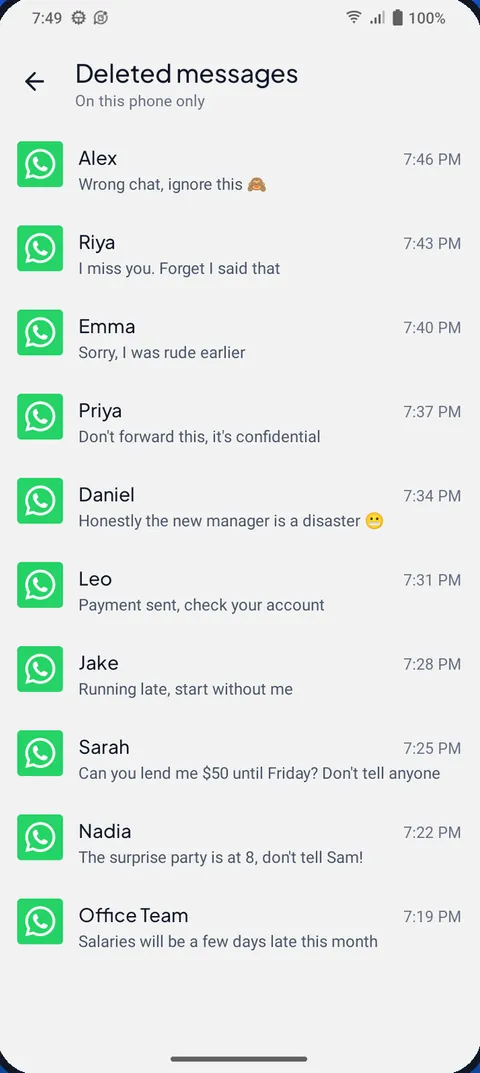
Turn on Save notifications for WhatsApp, Messenger or Instagram, and when someone deletes a message you got as a notification, you can still read what it said. You can also get a notification when it happens.
Honest limits: only text that reached your notifications after you turned it on, no photos or files, and a lone deleted message is flagged only while the phone was locked or the screen was off.
Guides: see deleted WhatsApp messages · Messenger, Telegram and imo
Notification history you control
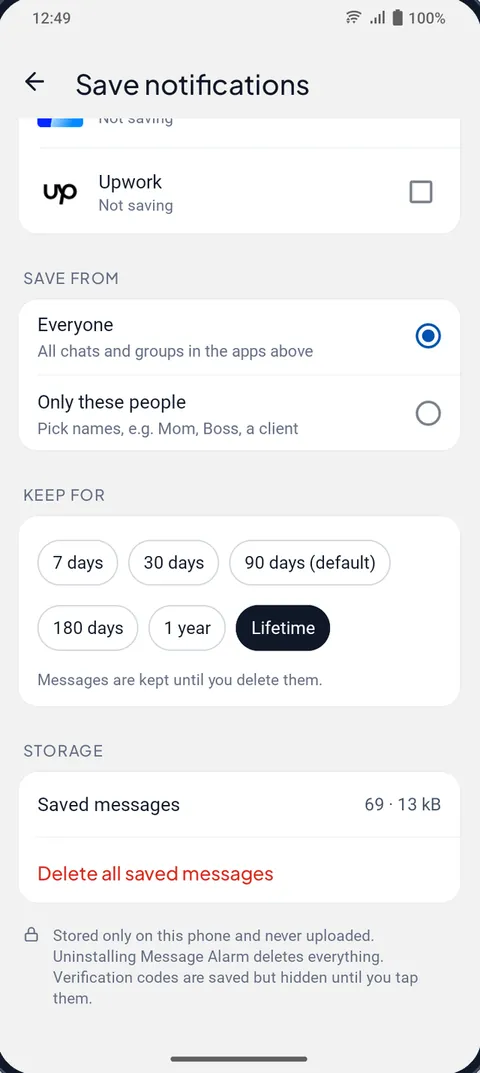
Android forgets notifications after 24 hours. Message Alarm saves the text of notifications from the apps you pick, by app and by person, searchable, for 7 days up to a lifetime. Verification codes are saved but stay hidden until you tap.
A spending tracker that reads your bank messages
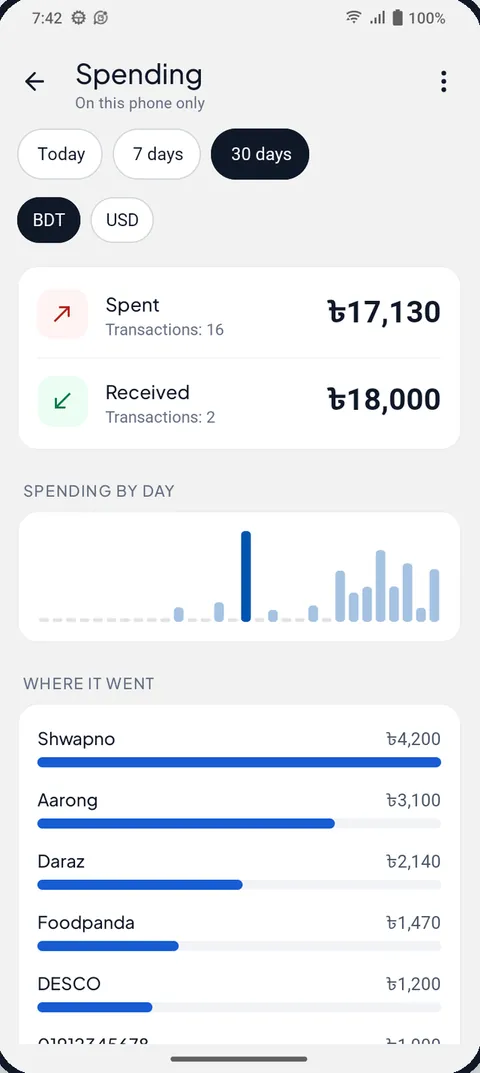
Turn it on and Message Alarm adds up what you spend and receive from your bank, card and wallet messages as they arrive: by day, by shop and by account, with a separate total for each currency. It reads bank and wallet messages from about 30 countries. No typing, no bank login, and it never reads your SMS inbox.
Guides: an SMS expense tracker · bKash and Nagad · UPI spending
Bill reminders before the due date
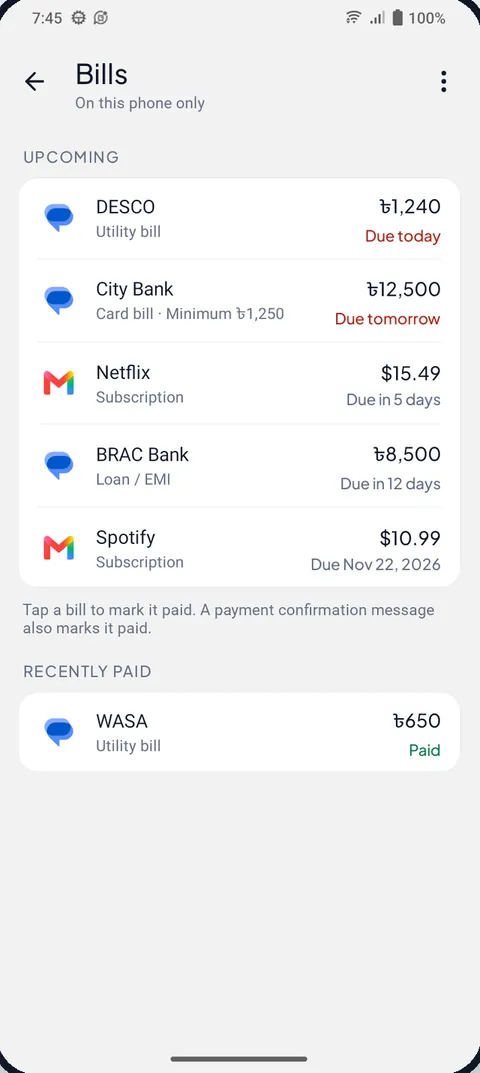
When a bank, card, biller or email notification says a payment is due, Message Alarm reminds you 2 days before and on the day. Tap "I've paid", or let the payment confirmation close it.
Smart features: find your phone, hear messages, hear payments
Free extras that work with any app. Each one stays off until you turn it on.
Find My Phone
Lost it on silent? Someone you trust sends your secret phrase and it rings at full volume for up to 2 minutes. No location is shared.
Read aloud
Hear who messaged you, and what they said, through your earphones, the car or the speaker. Never during calls, never codes.
Payment Soundbox
“500 taka received on bKash.” Money you receive, spoken out loud at the counter, from the payment apps you choose.
Rider arrival alarm
Rings when foodpanda, Uber, Pathao, Swiggy and other apps say the rider or driver has arrived. Not for “on the way”.
Family mode
Messages from the family names you pick always ring, even on silent, and can tell them you saw it.
See what rang, and why something didn't
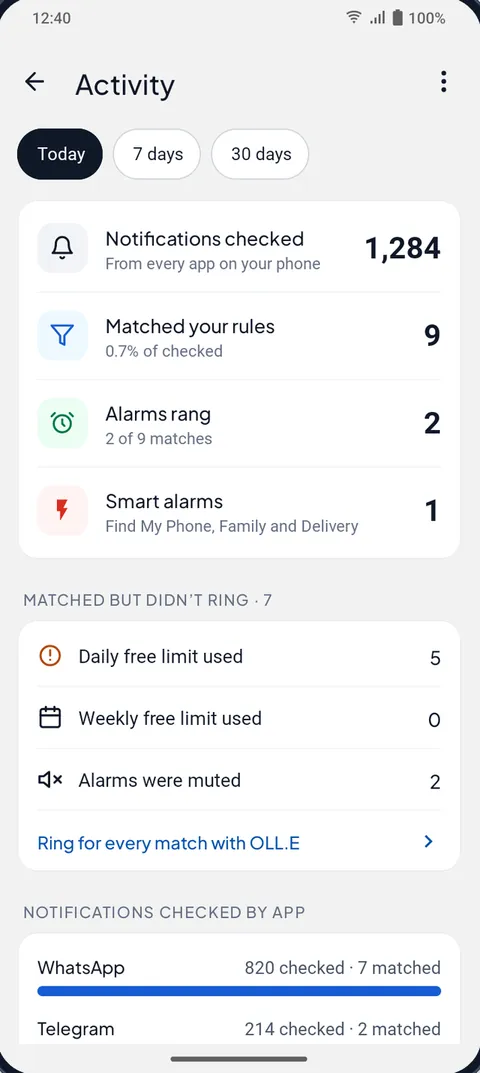
The Activity screen counts the notifications checked, matched and rung, and tells you why a match didn't ring: a free limit, muted alarms, or another alarm already ringing. Insights show your busiest hours and who messages you most, worked out on your phone.
How to set an alarm for a message
- Install Message Alarm from Google Play and allow notification access. Messages are checked on your phone.
- Add the app to watch, such as WhatsApp, Telegram or your SMS app. The free plan watches 2 apps.
- Set who and what: the people to ring for, words like "urgent", and the hours. Leave them empty to ring for every message.
- When a message matches, the alarm rings at the volume you chose, even on silent, with the sender and message on screen.
Some phones stop apps in the background to save battery. Message Alarm walks you through it, and these guides cover the settings: Xiaomi, Samsung, Vivo, Oppo and Realme, Infinix and Tecno.
Who uses Message Alarm
Freelancers and remote workers
Ring for the words your clients use, like “urgent” or “revision”, and sleep through the rest.
Keyword alerts ›Instagram and online sellers
Make customer DMs ring and send likes and follows to the Inbox.
Instagram DM alerts ›Traders
Turn MetaTrader pushes and broker SMS into an alarm, only during the sessions you trade.
MT4 and MT5 alerts ›Shop owners
Hear every payment, keep order alerts loud and hide the offers.
Payment Soundbox ›Parents and family
Let a child’s or a parent’s message ring through silent, every time.
Family mode ›Heavy sleepers and night shifts
Keep the phone on silent at night and still wake for the one message that matters.
A loud message alarm ›
Private: your messages stay on your phone
- Notifications are checked on your phone. Message content is never uploaded.
- Saved messages, the Smart Tray Inbox, spending, bills and insights are stored only on this phone, and deleted when you uninstall.
- Save notifications, Smart Tray, spending and bills stay off until you turn them on.
- Verification codes are hidden until you tap them.
- No ads. No access to your contacts, SMS, calls, camera or location.
The app sends a little technical data, such as crash reports and anonymous usage counts, never your messages. Read the privacy policy.
What is free
| Feature | Free plan |
|---|---|
| Watched apps | 2 |
| App alarms | 3 a day, 15 a week |
| Auto-replies | 2 a week |
| Smart Tray, Quiet mode, digest | Unlimited |
| Saved and deleted messages, history | Unlimited |
| Spending tracker, bill reminders | Unlimited |
| Find My Phone, Read aloud, Payment Soundbox, Rider arrival, Family mode | Unlimited, and they ring even when app alarms are used up |
Daily alarms reset at midnight. Weekly alarms and auto-replies reset every Monday. No ads.
Message Alarm or what your phone already has?
| What you need | Android built-in | Message Alarm |
|---|---|---|
| A loud alarm for one person's chat messages on silent | No. Starred contacts can get through Do Not Disturb for calls and texts, at the normal notification sound | Yes, any chat app, on the alarm sound |
| Ring only when a message says a word | No | Yes, in any language |
| Read a deleted message | Notification history keeps 24 hours, if it is turned on | Yes, for saved messages, 7 days to lifetime |
| Keep only important notifications in the tray | Per-app settings, all or nothing per channel | Smart Tray rules by person, word, group or category |
| Real silence with exceptions you choose | Do Not Disturb with allowed people and apps | Quiet mode alerts only what Smart Tray keeps |
| Where it runs | On the phone | On the phone, messages never uploaded |
What people say
“Using Message Alarm […] for last 8 months. It’s really great helpful Apps for freelancer. Because, sometimes we missed our client's messages and couldn’t response them on time. So, this app will alarm you instantly. Really great initiative, I appreciate their efforts. Their live chat support also very fast.”
Rakib Hassan, Freelance web developer
“I was looking all over the internet for an app like this. Finally i got it. This app is exactly what I needed. I'm a freelancer and I don't wanna miss the client's msg while I'm asleep so I need to wake up as soon as I get a notification from fiverr, this app has helped me a lot.”
Susan Rao, SEO consultant
Questions people ask
Can Message Alarm ring when my phone is on silent or Do Not Disturb?
Yes. The alarm plays on Android's alarm sound, so it rings when the phone is on silent or vibrate, and through Do Not Disturb while alarms are allowed, which is the Android default. It rings only for the people and words you chose.
Which apps does it work with?
Any app that shows a notification: SMS, WhatsApp, WhatsApp Business, Telegram, Messenger, Instagram messages, Signal, Viber, imo, Gmail, Slack, banking apps and more. The free plan watches 2 apps at a time.
Is Message Alarm free?
Yes, and it has no ads. The free plan has 2 watched apps, 3 alarms a day and 15 a week, and 2 auto-replies a week. Smart Tray, Quiet mode, saved and deleted messages, spending, bills and the smart features are free with no limit.
Can it really show deleted WhatsApp messages?
It shows the text of messages that reached your phone as a notification after you turned on Save notifications. It can't show photos or files, messages from before you set it up, or chats you were reading with the app open. When the deleted message was the only new one, it is flagged only if the phone was locked or the screen was off. How deleted messages work.
Does Message Alarm upload my messages?
No. Your messages are checked on your phone and never uploaded. Saved notifications, the Smart Tray Inbox, spending, bills and insights stay on the phone. The app sends only basic technical data, such as crash reports and anonymous usage counts. Read the privacy policy.
How long does it keep notification history?
You choose: 7 days, 30 days, 90 days (the default), 180 days, a year or a lifetime. You can delete one chat, one app or everything at any time.
Why didn't my alarm ring?
Usually the phone's battery settings stopped Message Alarm in the background, or a free limit was used up, or alarms were muted. The Activity screen says why each match didn't ring. Some phones need one-time settings: Xiaomi, Samsung, Vivo, Oppo and Realme, Infinix and Tecno.
Is there an iPhone version?
No. Message Alarm is for Android 7.0 and later only, because iPhone apps are not allowed to read other apps' notifications.
What does Smart Tray do?
Smart Tray keeps only the notifications you choose in your notification bar and moves the rest to an Inbox in Message Alarm, delivered later or in a digest, so nothing is lost. Calls, alarms and Message Alarm's own alerts are never hidden, and it never suggests hiding a chat app. How to clean up your notification bar.
Where do I download Message Alarm? Is there an APK?
Get it from Google Play only. Copies of the APK on other sites are not ours, may be old, and don't get updates.
What if I need more than the free limits?
Message Alarm's free limits stay as they are. If you need more, the same team makes OLL.E, an AI watchman for messages, email and calendar that understands what a message means rather than matching keywords. OLL.E on Google Play.
Never miss the message that matters
Install free from Google Play. Android 7.0 and later.

Read the Message Alarm blog for guides on alarms, silent mode, deleted messages and phone settings.