
A loud message alarm for heavy sleepers and night shifts
By the Message Alarm team · Updated · 6 min read
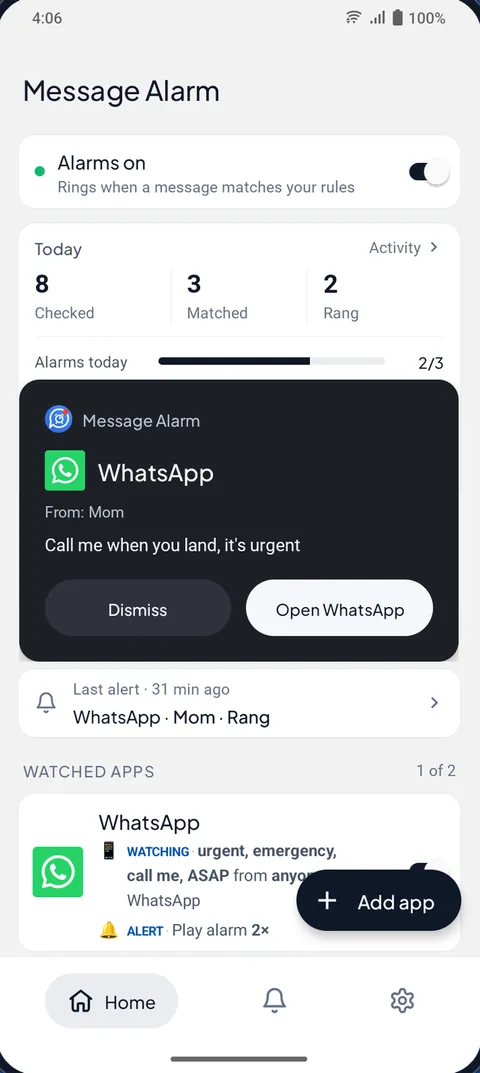
A normal notification won’t wake a heavy sleeper, but an alarm will, and Android lets an app play a message as an alarm. Message Alarm does that for the senders or words you choose: it rings on the alarm stream, so it gets through silent mode, turns the screen on, and plays up to 10 times. Everyone else stays silent until morning.
That is the whole idea. The rest of this page is about making it loud enough, and making sure it only goes off when it should. Android only.
Why can’t a notification sound wake you up?
It was never meant to. A notification plays one short sound at notification volume. Put the phone on silent and the sound disappears; on vibrate it becomes a single buzz against the mattress. Even with the volume up, a chime that brief is easy to sleep through, especially after a night shift.
Turning the ringer up all night is the obvious fix and the wrong one. You’d wake for every group chat, every shop offer and every “gm” from someone in another time zone. Our advice, and plenty of people disagree with it: keep the phone on silent at night and let an alarm decide what gets through. Three people who can wake you is a better deal than three hundred notifications that can.
What makes a message alarm loud enough?
Several things stack up, and each one is a setting you control.
| Normal notification | Message Alarm | |
|---|---|---|
| Sound channel | Notification volume | Alarm audio stream |
| On silent or vibrate | Muted or one buzz | Rings |
| Length | One short sound | 1 to 10 plays, each up to 30 seconds |
| Volume | Whatever it was set to | Raised to the alarm level you choose |
| Screen | Usually stays off | Turns on, with a full-screen card |
| Extra | None | Vibration, vibrate only, or flashing flashlight |
The tone matters more than people think. You can pick any audio file and trim it to 30 seconds. We’d choose something you never hear in the day, so that half asleep you know straight away this is a message and not your morning alarm. If a sound wakes you better when it builds, trim a clip that starts quietly and gets louder.
Light helps some sleepers more than noise. The flashlight can flash with the alarm, which is useful if you share a room and want to keep the volume lower. If you sleep with earbuds in, test once with them connected before relying on it.
How do you keep the day quiet with night-only rules?
Add Only during set hours to the rule. Windows can cross midnight, so 10 PM to 7 AM works. Night shift workers can flip it: if you sleep from 9 AM to 4 PM, set that window instead, and the alarm stays out of the way during your working night.
Repeat decides the days. Always means every day, Custom days lets you pick (handy for a rota that only covers weekends), and Once switches the alarm off after one alarm, for the single night you’re waiting on news.
Want the phone silent in a more thorough way? Quiet mode makes your phone really silent with its own Do Not Disturb rule, and Message Alarm alerts only what you keep. It needs Smart Tray turned on, has a Sleep schedule (11 PM to 7 AM) or a custom one, and alarms always ring in it; that switch is locked on. The guide to Do Not Disturb and Quiet mode explains how the pieces fit.
What about family emergencies in the middle of the night?
Use Family mode for those. Messages from the family names you pick ring like an alarm, even on silent and even when Message Alarm’s other alarms are muted. You set the number of rings from 1 to 10 (3 by default), and a “Ring even on silent” switch decides whether silent mode gets a full ring or a vibration.
Two things make it a good fit for nights. It is free and unlimited, and it keeps ringing even after the free app alarms for the day are used up. And there’s an optional “Let them know I saw it” reply, sent from your own account in that chat app when you stop the alarm, so a worried parent isn’t left wondering. Names must match exactly, and group names never count: it has to be the family member writing. More in Emergency Bypass on Android for family messages.
How do you stop one chatty person ringing all night?
Turn on Auto-mute after an alarm. After one alarm rings, Message Alarm stays quiet for a time you choose, or until you unmute it, so a friend who sends eight messages in a row at 2 AM wakes you once, not eight times. You can also set it to never mute, if every match matters.
Group chats are the other night-time risk. A rule limited to names with Only alarm for won’t ring for a group as a whole, because inside a group the real sender counts, never the group’s name. If your partner writes in the family group, it rings; if the rest of the family discusses dinner, it doesn’t. For keeping busy groups out of your notification bar altogether, see muting a group chat but keeping your @mentions.
What should you check before going to sleep?
Do this once, on a night when it doesn’t matter, and you’ll trust it on the night it does.
- In Message Alarm, set the alarm volume level, the tone and the number of plays (up to 10).
- Allow Display over other apps so the full-screen card appears when the alarm rings.
- Add Only during set hours with your sleep window, for example 10 PM to 7 AM.
- Turn on Auto-mute after an alarm so a run of messages wakes you once.
- Open Fix background issues and set battery use to Unrestricted, plus Auto-start if your phone has it.
- Check that your phone’s Do Not Disturb or bedtime settings still allow alarms.
- Put the phone on silent, lock it, and ask someone to send you a test message.
For step 6 on newer Android, open Settings → Modes, pick the mode you sleep with, then Notification filters → Alarms & other interruptions. Older versions call it Do Not Disturb, and names vary by phone, so if you can’t find it, open Settings and search for “Do Not Disturb” or “Bedtime”.
Will it ring through Do Not Disturb?
Yes, when alarms are allowed, which is the Android default. Out of the box, Do Not Disturb lets alarms through. If you’ve changed it to block alarms as well, it blocks Message Alarm too, and your morning alarm clock with it, which few people want. Nothing makes an alarm certain, so the test in step 7 is the only proof that counts. The page on missed message reminders explains what to do if a match didn’t ring.
Message Alarm is free with no ads, on Android 7.0 and later. The free plan covers 2 watched apps, 3 app alarms a day and 15 a week, and 2 auto-replies a week; for most sleepers, three alarms a night is already a bad night. Family mode and the other smart features, Smart Tray, Quiet mode, saved and deleted messages, notification history, the spending tracker and bill reminders are free and unlimited. Your messages are checked on your phone and are never uploaded.
Questions people ask
Is there an app that wakes me up when I get a message?
Yes. Message Alarm rings an alarm when a message arrives from a person or with a word you choose, even with the phone on silent. It turns the screen on and can play the tone up to 10 times.
Can a notification override silent mode?
A normal notification can’t; silent mode mutes it. An app that plays on Android’s alarm audio stream, as Message Alarm does, rings on silent and vibrate because those modes don’t mute alarms.
How do I stop it waking me for group chats?
Limit the rule to names with Only alarm for. Inside a group the real sender counts, never the group’s name, so the group only rings when one of those people writes. Auto-mute after an alarm stops a run of messages ringing again and again.
Will it ring through Do Not Disturb?
It rings through Do Not Disturb when alarms are allowed, which is the Android default. If you set Do Not Disturb to block alarms too, it is blocked like your alarm clock, so test it once before you rely on it.