
Missed message reminders on Android: make one important message hard to miss
By the Message Alarm team · Updated · 6 min read
Android plays a notification sound once and then goes quiet, and most phones have no setting to repeat it. You can fix that in two ways: a reminder app that chimes again every few minutes until you open the message, or an alarm that rings so loudly the first time that you can’t miss it. This guide covers both, and is honest about which one each app does.
Everything here is for Android. iPhones don’t allow apps to read other apps’ notifications, so neither kind of app exists for iOS.
Why does Android play a notification sound only once?
Because that is how notifications are designed. When a message arrives, its app posts a notification, the phone plays one sound at notification volume, and the notification sits in the tray waiting for you. Nothing in stock Android goes back an hour later to say “you still haven’t read this”. If the phone was on silent, that single sound never played at all.
A few phones do have a reminder option hidden somewhere. Open Settings and search for “notification reminder”. If nothing comes up, your phone doesn’t have one, and you need an app.
Should you use a reminder that repeats or an alarm you can’t sleep through?
They solve different problems, and picking the wrong one is the most common reason people give up on both.
| Repeating reminder app | Message Alarm | |
|---|---|---|
| What it does | Alerts again every few minutes until you look | Rings an alarm once per matching message, up to 10 plays |
| Works on silent | Check the app’s listing | Yes, it uses the alarm audio stream |
| Picks which messages | See the app’s listing | By sender, word, hours and days |
| After you ignore it | Keeps reminding | Leaves a “You missed an alarm from…” notification |
| Good for | Seeing a message, then forgetting it | Sleeping or working through the first chime |
| Examples on Google Play | Missed Notifications Reminder, Notification Reminder & Alerts (100K+ downloads each) | Message Alarm (100K+ downloads) |
If you glance at the screen, see the message, and forget about it by lunch, you want a reminder that keeps nagging. Missed Notifications Reminder and Notification Reminder & Alerts are built for exactly that, and Message Alarm is not. It doesn’t remind you every few minutes.
If the message never reached you in the first place, because you were asleep, in a loud room or had the phone on silent, a chime every five minutes is just more chimes you won’t hear. That is the problem an alarm solves. Our view, which you are free to disagree with: most “I missed it” stories are this second kind. The phone did its job, quietly, and quiet was the problem.
Our comparison of notification alarm apps has a short test that shows which apps ring on silent.
How do you make one message ring up to 10 times?
In Message Alarm, a matching message plays its tone 1 to 10 times, each play up to 30 seconds. At the top setting that can be a few minutes of ringing, with the screen turned on and the alarm volume raised to the level you chose.
- Install Message Alarm and allow Notification access, then Display over other apps for the full-screen card.
- Add the app the message will arrive in, such as your SMS app or Telegram, as a watched app.
- Under Only alarm for, type the sender’s name exactly as that app shows it.
- Set how many times the tone plays, up to 10, and the alarm volume.
- Ask the sender for a test message, leave the alarm unanswered, and check that a “You missed an alarm” notification is waiting.
The full-screen card shows the sender and the message, with Dismiss and Open. You can add vibration or flash the flashlight, which helps in a loud room. If nobody stops the alarm, the “You missed an alarm from…” notification stays in the tray, so the message has a second chance when you pick the phone up. That leftover notification is the closest thing Message Alarm has to a reminder, and for most people it is enough.
You don’t have to filter by a person. A word works too: “urgent”, “call me”, “today”. The keyword alerts guide has lists, and the SMS alarm guide covers texts in detail.
Can it ring only during work hours, or only at night?
Yes. Only during set hours limits a rule to a window, and the window can cross midnight, so 10 PM to 7 AM works as you would expect. Use it for the on-call week, or for the family member whose late texts mean something is wrong.
The setting called Repeat confuses people. It is about days, not about ringing again.
- Always means the rule is on every day.
- Once means the app’s alarm switches itself off after one alarm. That suits a single wait: the night you’re expecting one reply about a flight, a result or a lift home.
- Custom days lets you pick the days, for example weekdays only.
None of these makes the alarm ring again for the same message. The number of plays is a separate setting, from 1 to 10.
What does it mean when a message matched but didn’t ring?
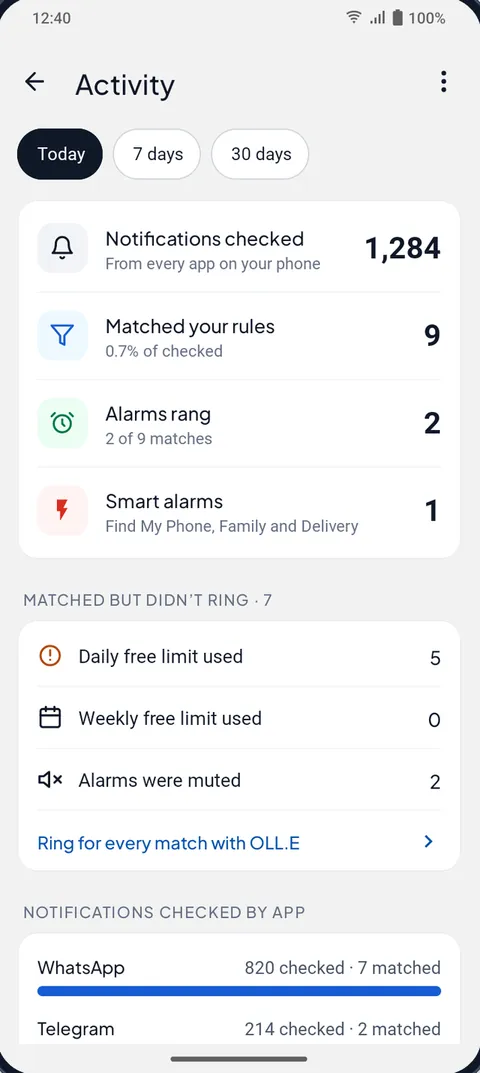
Open the Activity screen. It counts the notifications checked, the ones that matched your rules, the ones that rang, and lists the matches that didn’t ring with the reason. There are four reasons, and each has its own fix.
A daily or weekly limit means the free plan’s alarms were used up: 3 app alarms a day and 15 a week. The daily count resets at midnight and the weekly one every Monday. If you hit it often, the rule is probably too wide; narrow it to fewer senders or more specific words.
Alarms muted means you, or Auto-mute after an alarm, silenced alarms for a while. Check the setting if it surprises you.
“Not rung · alarm already ringing” means two matches arrived together. Only one alarm rings at a time.
And if a message you expected doesn’t appear at all, not even as checked, the phone probably stopped Message Alarm in the background. In the app, open Fix background issues and set battery use to Unrestricted, plus Auto-start on brands that have it.
Does it work for missed calls?
No. Phone calls and missed calls are not triggers; Message Alarm skips call notifications entirely. For calls, use your phone’s own settings. On newer Android, open Settings → Modes, pick a mode, then Notification filters → People, where you can let starred contacts and repeat callers through. Older versions call this Do Not Disturb, and the names vary by phone.
Will a message alarm drain the battery?
We don’t have a number to give you, and we would be wary of any app that quotes one without saying how it was measured. Message Alarm works from the notifications Android already delivers and checks them on the phone. Look at your phone’s battery usage screen after a couple of days and you’ll see what it costs on your model. The more common problem runs the other way: a phone so keen to save battery that it closes the app overnight.
Message Alarm is free and shows no ads. The free plan covers 2 watched apps, 3 app alarms a day and 15 a week, and 2 auto-replies a week. Smart Tray, Quiet mode, saved and deleted messages, notification history, the spending tracker, bill reminders and smart features like Family mode are free with no limit. Your messages are checked on your phone and are never uploaded. If sleep is the real issue, the guide to a loud message alarm for heavy sleepers goes through a bedtime set-up.
Questions people ask
How do I get repeated notification reminders on Android?
Most phones have no built-in option, so you need an app. Reminder apps such as Missed Notifications Reminder alert you again until you look; Message Alarm instead rings an alarm up to 10 times when the message arrives and leaves a missed-alarm notification if you don’t stop it.
Can my phone ring for one sender’s messages?
Yes. In Message Alarm, add the chat or SMS app as a watched app and type the sender’s name under Only alarm for, exactly as the app shows it. It rings on the alarm stream, so it works on silent.
Does it work for missed calls?
No. Calls and missed calls are not triggers in Message Alarm. For calls, use your phone’s Modes or Do Not Disturb settings to let starred contacts and repeat callers through.
Will it drain the battery?
We don’t publish a battery figure. Message Alarm checks the notifications Android already delivers, on the phone; your phone’s battery usage screen shows what it costs on your model after a day or two.