
SMS alarm on Android: make a text from one person ring like an alarm (Telegram and Messenger too)
By the Message Alarm team · Updated · 7 min read
Android can’t turn a text into an alarm on its own, but an app that reads notifications can. Message Alarm watches your SMS app and rings a real alarm, at alarm volume and even with the phone on silent, when a text arrives from the person you name or with a word you pick. The same rule works for Telegram and Messenger.
This is Android only. iPhones don’t let one app read another app’s notifications, so nothing in this guide can be copied over to iOS.
Can your phone ring like an alarm for a text?
Not with the settings it ships with. The closest built-in option is a custom tone for one contact. Most messaging apps let you open a conversation’s details and change its notification sound, so your partner’s texts sound different from the dentist’s reminders. Look for “Notifications” or “Sound” in the chat’s settings; the exact names depend on which SMS app you use.
A custom tone has three limits. It plays once. It plays at the same volume as every other notification. And when the phone is on silent it doesn’t play at all: silent mode mutes it, and vibrate turns it into a buzz you won’t feel through a pillow.
So a custom tone is fine for telling texts apart during the day. For a message you would be upset to sleep through, it is the wrong tool, because the moment you most need it (asleep, phone face down on silent) is exactly when it stays quiet. That is the gap an SMS alarm fills.
How do I set an SMS alarm in 4 steps?
The whole set-up takes a few minutes. Have the sender’s name ready exactly as your messaging app shows it.
- Install Message Alarm from Google Play and allow Notification access when it asks.
- Add your SMS app (the Messages app you read texts in) as a watched app.
- Under Only alarm for, type the sender’s name exactly as your SMS app shows it, or put words under Message contains.
- Pick the tone, how many times it plays (1 to 10) and the alarm volume, then ask the sender for a test text while your phone is on silent.
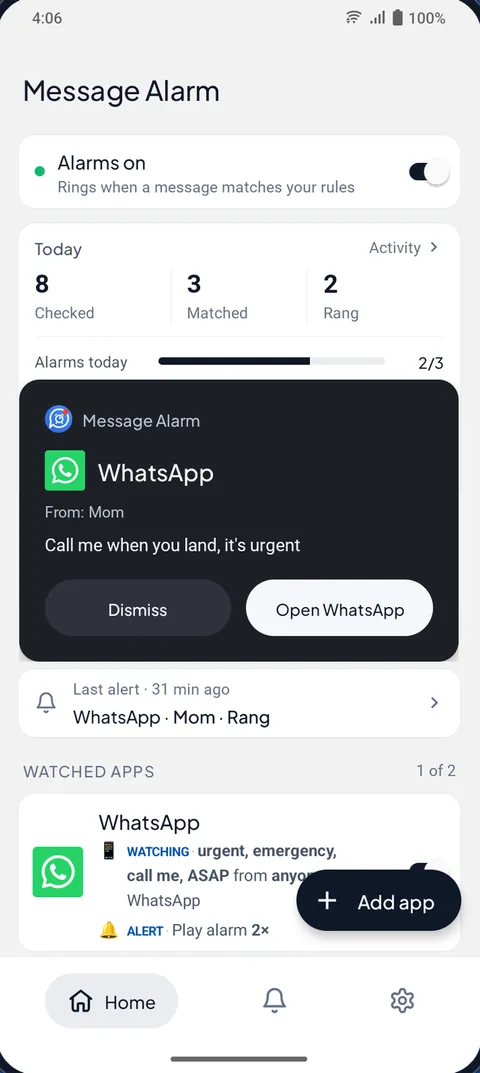
Allow “Display over other apps” too if you can. With it, the alarm opens a full-screen card that shows who wrote and what they said, with Dismiss and Open buttons. Without it you get a notification instead, which works but is easier to swipe away half asleep.
Can it ring for only one sender, like a person, a bank or a school?
Yes, and that is the most common use. Only alarm for takes a list of names, so “Mum”, “Dad” and the name you saved for your child’s school can sit on the same rule. A text from anyone else arrives the normal way, with the normal sound, and the alarm stays out of it.
There is also the reverse, Never alarm for, which rings for everyone except the names you list. One app can use one or the other, not both. Pick Only alarm for when there are a handful of people who matter; pick Never alarm for when nearly everyone matters and two or three senders are just noise.
Banks and schools often text from a short sender name rather than a number. That’s fine: whatever your SMS app shows as the sender is what you type. For a bank, a word rule is often more useful than a name rule anyway, because you probably care about “debited” and not about the bank’s weekly offer.
Can a text ring only when it says “urgent”?
Put the word under Message contains. Message Alarm matches whole words and ignores capital letters, so “URGENT”, “Urgent” and “urgent” all ring, while “urgently” is a different word and won’t. Phrases work too: “call me” is a good one, because people who need you right now tend to write it.
Set a name and words together and it rings only when that person sends one of those words. That’s a tight filter, useful for a colleague who texts all day but writes “urgent” perhaps once a month. The app’s “Try an example” rules include a ready-made one for urgent messages (urgent, emergency, call me, ASAP). The guide to keyword alerts has word lists for different jobs.
Does the same rule work for Telegram and Messenger?
It does, because Message Alarm reads notifications and doesn’t care which app produced them. Add Telegram or Messenger as another watched app and give it its own rule: a different list of names, different words, different hours. A Telegram message alarm for one work group’s lead, an SMS alarm for family, and a Messenger alarm for a landlord can all run side by side. It works with WhatsApp in the same way.
One practical point. Each app counts as a watched app, and the free plan allows two. If you want SMS and Telegram, that’s both slots used, so choose the two apps where the important messages actually arrive.
Will it ring on silent and in Do Not Disturb?
On silent and vibrate, yes. The alarm plays on Android’s alarm audio stream, the same one your morning alarm clock uses, so the ringer switch doesn’t touch it. The app also turns the screen on and raises the alarm volume to the level you chose, and you can add vibration or a flashing flashlight.
Do Not Disturb is slightly different. It rings through Do Not Disturb when alarms are allowed, which is the Android default. If you have told your phone to block alarms too, it is blocked like any other alarm. To check, open Settings → Modes, pick the mode, then Notification filters and look under Alarms & other interruptions. On older versions the same screen is called Do Not Disturb, and Google’s Modes and Do Not Disturb help page notes that it varies by phone. For a fuller explanation of what each mode lets through, see letting one app through Do Not Disturb.
Why didn’t my SMS alarm ring?
Usually one of four reasons. The Activity screen names the last three for every match that didn’t ring.
- The phone stopped the app. Some phones close apps in the background to save battery. In Message Alarm, open Fix background issues, set battery use to Unrestricted (some phones say Don’t optimize), and turn on Auto-start on Xiaomi, Vivo, Oppo, Realme, and in Phone Master on Infinix, Tecno and itel. Xiaomi owners can follow the Xiaomi delayed notifications fix, and Don’t kill my app lists what other brands do.
- The free limit ran out. Three app alarms a day and 15 a week; the daily count resets at midnight and the weekly one on Monday.
- Alarms were muted, for example by Auto-mute after an alarm, which keeps things quiet for a while after one rings.
- Another alarm was already ringing. Only one rings at a time, and the second shows as “Not rung · alarm already ringing”.
If the Activity screen shows the text as checked but not matched, the rule is the problem, and most often it’s the spelling of the name. Also note that calls are never a trigger: a missed call won’t ring an alarm, only messages do.
Custom tone, Do Not Disturb exception or a message alarm: which does what?
| Custom tone per contact | Do Not Disturb exception | Message Alarm | |
|---|---|---|---|
| Rings with the phone on silent | No | No; it gets through Do Not Disturb but plays at normal volume | Yes, on the alarm stream |
| Plays more than once | No | No | 1 to 10 times |
| Triggered by a word | No | No | Yes, whole words and phrases |
| Only at certain hours | No | Yes, with a scheduled mode | Yes, overnight windows too |
| Telegram and Messenger | Depends on the app | Whole app, or priority conversations where offered | Yes, per sender or word |
| Cost | Built in | Built in | Free: 2 watched apps, 3 alarms a day |
If you only want to know who texted without looking, the custom tone is enough. If you want a few people to reach you during a scheduled quiet time, the Do Not Disturb exception is built for that (the guide on making certain contacts ring on silent walks through it). If a text needs to wake you, you need an alarm.
Does Message Alarm read all my messages?
It reads the notifications of the apps you choose to watch, because that is how it sees a new text. It doesn’t ask for SMS permission and it doesn’t open your SMS inbox, so older texts aren’t touched. Your messages are checked on your phone and are never uploaded. The app does send a little technical data, such as crash reports and alarm counts, which its privacy policy lists.
Message Alarm is free with no ads. The free plan covers 2 watched apps, 3 app alarms a day and 15 a week, and 2 auto-replies a week. Smart Tray, Quiet mode, saved and deleted messages, notification history, the spending tracker, bill reminders and the smart features such as Family mode are free without limits. It needs Android 7.0 or later. If three a day sounds tight, think of it this way: an alarm you hear three times a day is an alarm you will soon start ignoring.
Questions people ask
Can I set an alarm for a text message on Android?
Not with Android’s own settings, which only let you change a contact’s tone. An app that reads notifications, such as Message Alarm, can ring a real alarm when a text arrives from a sender you name or contains a word you choose.
Will it ring if my phone is on silent?
Yes. Message Alarm plays on Android’s alarm audio stream, so silent and vibrate don’t mute it. It also rings through Do Not Disturb when alarms are allowed, which is the Android default.
Can I get an alarm for only one contact’s texts?
Yes. Add your SMS app as a watched app and type the contact’s name under Only alarm for, exactly as your messaging app shows it. Texts from everyone else arrive with the normal sound.
Does Message Alarm read all my messages?
It reads the notifications of the apps you choose to watch, and nothing older. It has no SMS permission and doesn’t open your SMS inbox. Your messages are checked on your phone and are never uploaded.