
Xiaomi, Redmi and POCO notifications late? The HyperOS settings that fix it
By the Message Alarm team · Updated · 7 min read
When notifications on a Xiaomi, Redmi or POCO phone arrive late, the cause is nearly always HyperOS stopping the app in the background, not your network and not the app itself. Turn on Autostart for that app, set its Battery saver to No restrictions and lock it in recent apps. On most phones those three changes are enough.
The giveaway is the timestamp. You pick up the phone, open a chat, and four messages drop in at once, all stamped half an hour ago. Nothing was wrong with the sender. The phone simply held the app still until you touched it.
Why does Xiaomi delay notifications?
HyperOS, like MIUI before it, stretches battery life by freezing apps that aren’t on screen and by refusing to let them start themselves again. A chat or banking app needs a short moment of background time to turn an incoming message into a notification. If the system has frozen it and Autostart is off, that moment never comes, and the message waits until you open the app.
This isn’t a rumour from forums. The open-source site Don’t kill my app ranks phone makers by how hard they make life for background apps, and Xiaomi sits at the worst end of its scale. Its Xiaomi page says that with default settings, background processing "simply does not work right". My view: the defaults are tuned to make the battery graph look good in a review, and the price is paid by anyone who waits on a message from a client, a school or a bank.
Which HyperOS settings fix late notifications?
Do this for the one to three apps whose messages really matter. Not for every app on the phone; that would undo the battery saver completely, and you would notice it by evening. The names below are the ones Xiaomi uses on recent versions; names vary by model and update.
- Open Settings › Apps › Manage apps and pick the app whose notifications come late.
- Turn on Autostart. If you can’t find it, open Settings and search for “Autostart”.
- Tap Battery saver (on some versions just Battery) and choose No restrictions.
- Tap Notifications for the same app and check that Lock screen notifications and Floating notifications are on.
- Open recent apps, long-press the app’s card and tap the lock icon so the clean button skips it.
What does each Xiaomi setting actually change?
Autostart
Autostart decides whether an app may start itself: after the phone restarts, or after the system has closed it. With Autostart off, a closed app stays closed until you tap its icon. On older MIUI the switch lived in the Security app under Permissions › Autostart, and MIUI 14 added a separate “Background autostart” permission inside the app’s own permissions list. On HyperOS it usually sits on the app’s info page. If you can’t find it, open Settings and search for “Autostart”.
Battery saver: No restrictions
Each app has its own battery saver level. The default lets HyperOS decide when to stop the app, and it tends to decide early once the screen is off. No restrictions takes the app out of that decision. On some versions you reach it through Settings › Battery › App battery saver instead; search Settings for “Battery saver” if the app page doesn’t show it.
Ultra battery saver is a separate, phone-wide mode. While it is on it limits the phone to a small set of apps, so expect messages to wait no matter what you set per app. Turn it off when you are expecting something.
Lock screen and floating notifications
This one isn’t about background limits, but it often gets mistaken for them. If an app’s Floating notifications and Lock screen notifications are off, a message can arrive on time and sit silently in the shade with no banner. It feels late. It isn’t. Check both switches in the app’s notification settings while you are there.
Why lock the app in recent apps?
The clean button at the bottom of the recent apps screen closes everything that isn’t locked, and a closed app on Xiaomi stays closed if Autostart is off. Locking marks the app as one to keep. On recent versions you long-press its card and tap the padlock; on some older ones you drag the card downward until a lock appears. Older MIUI also had a lock list inside the Security app under Boost speed, which matters because Boost speed is a memory cleaner and clears apps that aren’t on that list.
If you clear recent apps out of habit several times a day, locking is the single change that helps most. Honestly, the habit itself is worth dropping. Android manages memory without your help.
How can you test the fix in one minute?
- Lock the phone and leave the screen off.
- From another phone, or from the app’s web version on a computer, send yourself a message.
- Watch the clock. A healthy setup shows the notification within seconds.
That quick test proves the settings took. The harder test is the one that caught you before: leave the phone idle for an hour, or overnight, and ask someone to message you. Battery savers get stricter the longer the screen stays off, so a phone can pass at minute one and still fail at three in the morning. If the overnight test passes, you are done.
What if notifications are still late after all this?
First rule out the easy things. Is Do Not Disturb on? Is the chat itself muted? Did the app’s own notification settings change after an update? Then look for proof of what the phone did.
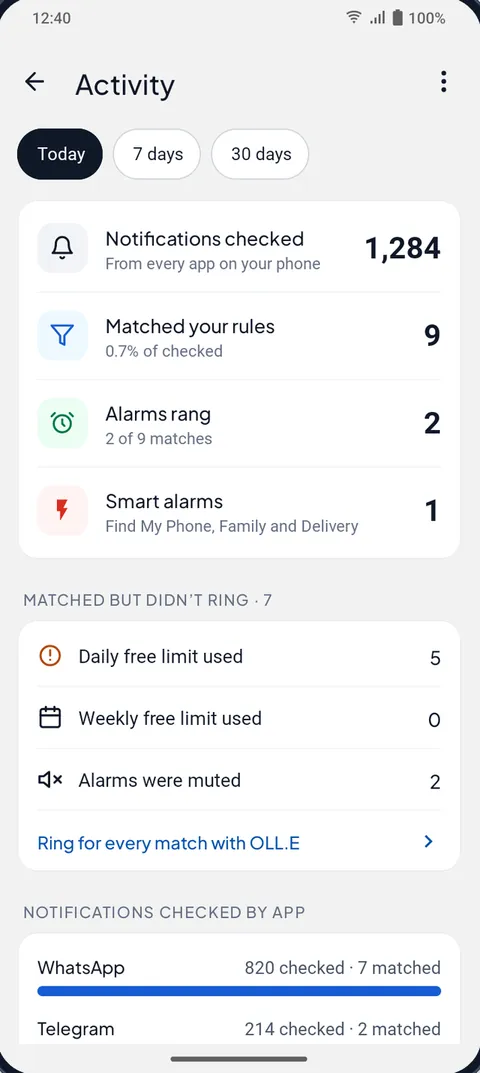
Message Alarm helps here, even if you only use it for a day. Its Activity screen lists the notifications it checked, which ones matched your rules, which rang, and why a match didn’t ring (a daily or weekly limit, alarms muted, another alarm already ringing). If a message you know was sent never shows up there at all, Message Alarm never got to see it, which points straight back at the battery settings above. And if you use Smart Tray, its health check warns you on Home when Android paused it for 30 minutes or more, with a line like “Smart Tray was paused 3 h last night. Android stopped Message Alarm. Nothing was lost.”
Message Alarm also needs the same treatment as any other app on a Xiaomi. Its “Fix background issues” card has two parts: Battery, to set its battery use to Unrestricted (No restrictions on Xiaomi), and Auto-start, which opens Xiaomi’s Autostart screen for you. Because Android doesn’t tell apps whether auto-start is on, it then asks “Is auto-start on?” and trusts your answer.
Does the same fix work for email and banking apps?
Yes. Any app that has to wake up to tell you something goes through the same three gates: Autostart, battery saver and the clean button. Email, banking, a ride app, a smart home app, an alarm app. If you also want to see what arrived while you weren’t looking, Android’s notification history and the options in our notification history guide show every notification after the fact.
| What to change | Name on recent HyperOS | Older MIUI name or place | What it stops |
|---|---|---|---|
| Start permission | Autostart, on the app’s info page | Security › Permissions › Autostart; “Background autostart” on MIUI 14 | The app starting itself after a restart or after it was closed |
| Battery level | Battery saver › No restrictions | Battery & performance › App battery saver | Background work being cut once the screen is off |
| Keep in memory | Long-press the card in recent apps, tap the lock | Drag the card down; Security › Boost speed › Lock apps | The clean button and cleaner closing the app |
| Show the alert | Lock screen notifications, Floating notifications | Same names | A message arriving on time but silently |
Other phone makers do the same thing under different names. Samsung uses sleeping lists (see Samsung’s Never sleeping apps), Vivo, Oppo and Realme use background power switches (see the Vivo, Oppo and Realme guide), and Infinix, Tecno and itel hide theirs in Phone Master (see the Infinix and Tecno guide).
Once messages arrive on time, Message Alarm can make the important ones loud. It rings a real alarm, even on silent, when a message comes from a person you name or contains a word you choose, the way an SMS alarm works for texts. The free plan watches 2 apps and rings up to 3 app alarms a day and 15 a week, with 2 auto-replies a week. Smart Tray, Quiet mode, saved and deleted messages, notification history, spending, bills and the smart features are free with no limit, and there are no ads. Your messages are checked on your phone and never uploaded.
Questions people ask
Why are my notifications late on Xiaomi?
HyperOS stops apps in the background to save battery and doesn’t let them start themselves again. Until you turn on Autostart and set the app’s Battery saver to No restrictions, its messages can wait until you open it.
How do I stop Xiaomi from closing apps?
Turn on Autostart for the app, set its Battery saver to No restrictions, and lock it in recent apps so the clean button skips it. If a name isn’t on your phone, open Settings and search for it.
Does this drain my battery?
Not much for one to three apps that mostly wait for messages. The cost comes from giving every app the same freedom, so keep the list short and leave the rest on the default battery saver.
Do I need to do this after every update?
Not every time, but big system updates can reset per-app settings. If delays come back after an update, check Autostart and Battery saver again and repeat the quick locked-screen test.