
Notification history on Android: see notifications older than 24 hours
By the Message Alarm team · Updated · 6 min read
Android’s built-in notification history only shows the last 24 hours, and only after you switch it on. To see notifications older than that, you need an app that saves them as they arrive and keeps them for as long as you choose: a week, a year, or until you delete them.
Both options are Android only, and both start from the day you turn them on. Nothing can fill in the weeks before.
How do you turn on notification history on Android?
Notification history is a log Android keeps of the notifications you received in the last 24 hours, including the ones you swiped away. Open Settings and search for “Notification history”. Tap the result and switch on “Use notification history” or the similarly named switch on your phone. Google describes the feature on its Control notifications help page.
Give it a day to fill up. After that, open the same screen and you will see each app’s recent notifications with their text and time. On Pixel and many other phones the list starts with what you recently dismissed, which answers the most common version of the question: “I swiped it away by accident, what did it say?”
Where is it on Samsung, Pixel and Xiaomi?
The name is the same almost everywhere. Where it lives is not: it moves between brands, and sometimes between two updates of the same phone. On Samsung, Pixel, Xiaomi, Redmi or POCO, open Settings and search for “Notification history”. That beats any menu path, because the search box knows your exact version and an article can’t.
If the search finds nothing, your phone’s version may not offer the screen. In that case a saver app is the only way to get a history, short or long.
If it does exist, leave it on even after you install a saver. It costs nothing, it covers every app rather than the few you pick, and for “what was that notification I just swiped?” it is the quickest place to look.
How do I keep notifications for more than 24 hours?
Use a notification saver. Message Alarm has one built in, called Save notifications. It is off by default. When it is on, it saves the text of each new notification from the apps you pick, organised by app and person, and lets you search it.
- Install Message Alarm from Google Play and allow Notification access.
- Open Save notifications and switch it on.
- Pick the apps you want a history for, such as WhatsApp, Telegram, Gmail or your bank app.
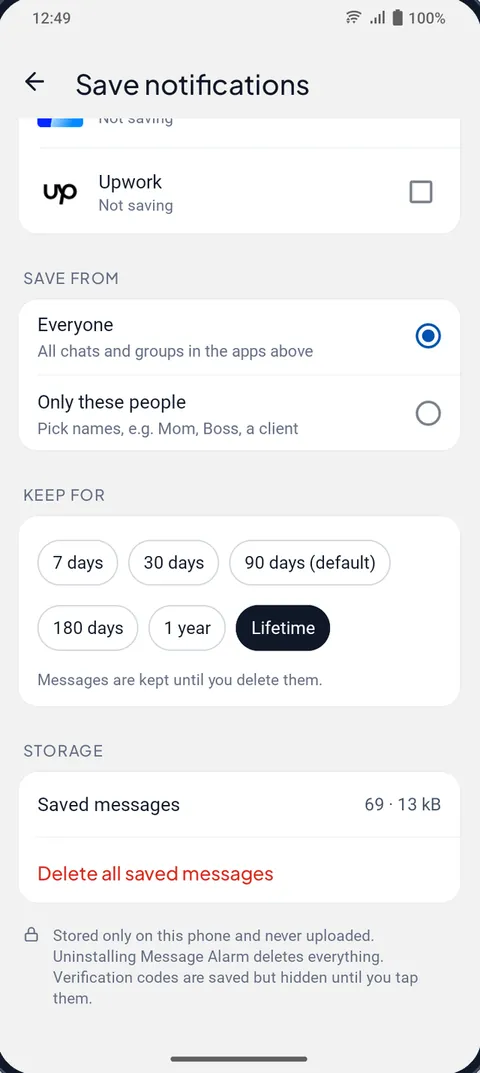
- Choose whether to save from everyone in those apps or only from people you name.
- Set Keep for to 7 days, 30 days, 90 days, 180 days, 1 year or Lifetime.
90 days is the default. Lifetime means until you delete it yourself. The list of matched alarms has the same choices, so you can keep both for the same length of time.
Our advice: don’t save everything. A history of every shopping offer and game reward is a long scroll with nothing in it. Pick the few apps whose messages you would actually go back for, usually your chat apps and maybe your bank, and leave the rest out.
How do I find one person’s old messages?
Saved notifications are filed by app, then by person. Open the app, open the person, and you get their messages in order, as text. There is also a search box, which is quicker when you remember a word but not who sent it, like an address, a price or a tracking number.
A related trick: when someone deletes a message you had already saved, it gets marked as deleted and you can still read it under Deleted messages. That part is built for WhatsApp, WhatsApp Business, Messenger and Instagram, and it has limits worth reading about in how to see deleted WhatsApp messages and what you can read after a message is unsent on Messenger, Telegram or imo.
Why are verification codes hidden?
Because a list of every one-time code you have received is the last thing you want visible on a screen someone else might glance at. Message Alarm still saves them, so you can find an old code if you need it, but each one stays hidden until you tap it.
Notisave, Notification History Log or Message Alarm?
These are the names that come up when people look for a notisave alternative. The built-in history is in the table too, as the baseline.
| Option | Downloads | Ads | In-app purchases | How long it keeps |
|---|---|---|---|---|
| Android notification history | Built in | No | No | 24 hours |
| Notisave - Notification Log | 10M+ | Yes | Yes | See listing |
| Notification History Log | 5M+ | Yes | Yes | See listing |
| Message Alarm | 100K+ | No | No | 7, 30, 90 or 180 days, 1 year, or lifetime |
The two log apps are much bigger and focus on logging. Message Alarm’s history sits alongside alarms for important messages, Smart Tray and a few other features, which suits you if you want those too and is extra weight if you don’t. Whatever you choose, read the Data safety section on the app’s listing first. You are handing it everything your notifications say.
What can’t a notification history save?
Anything the notification didn’t contain. Photos, videos, voice notes and files are not saved; a photo shows up as “📷 Photo”. Messages you read with the chat open never became notifications. Muted chats that stay silent leave nothing behind either.
Time is the other limit. A saver starts from the moment you turn it on, so last month’s notifications are out of reach for every app, including this one.
And the app has to be running. Some phones close background apps to save battery, and a closed app saves nothing. Message Alarm’s “Fix background issues” screen helps you set battery use to Unrestricted and, on Xiaomi, Vivo, Oppo and Realme, turn on auto-start. Xiaomi owners can read why Xiaomi notifications arrive late for the full set of settings.
If the real reason you keep losing notifications is that you swipe the whole bar away because it’s full of offers, fix that first. Our guide to a clean notification bar on Android shows how Smart Tray keeps only what you choose in the bar and moves the rest to an Inbox.
Is a notification history app safe?
It depends entirely on where the text goes. In Message Alarm, your messages are checked on your phone and are never uploaded; saved notifications stay on the phone. The app does send a little technical data, such as crash reports and an anonymous install ID, but not your messages. You can delete one chat, one app or everything at any time, and uninstalling deletes all of it. It does not ask for contacts, SMS, call log, location or files permissions.
Message Alarm is a free Android app whose main job is ringing a loud alarm, even on silent, when an important message arrives from a person or with a word you choose. Saved notifications, deleted messages and notification history are free and unlimited, as are Smart Tray, Quiet mode, the spending tracker and bill reminders. The free plan limits only the alarm features: 2 watched apps, 3 app alarms a day and 15 a week, and 2 auto-replies a week. No ads.
Questions people ask
Does Android keep a notification history?
Yes, but only for the last 24 hours and only after you turn it on. Open Settings and search for "Notification history" to switch it on.
How do I see notifications I swiped away?
Open Android's notification history, if you turned it on before the notification arrived; it lists recent notifications, including dismissed ones, for 24 hours. For anything older you need an app that saves notifications as they arrive.
How long can a notification history app keep notifications?
It depends on the app. Message Alarm's Save notifications keeps them for 7, 30, 90 or 180 days, 1 year, or lifetime, until you delete them. 90 days is the default.
Is a notification history app safe?
It depends on where the text goes, so check the listing's Data safety section. In Message Alarm your messages are checked on your phone and never uploaded, verification codes stay hidden until you tap, and uninstalling deletes everything.