
How to see deleted WhatsApp messages on Android, privately (and what no app can bring back)
By the Message Alarm team · Updated · 7 min read
You can read a deleted WhatsApp message on Android only if your phone kept a copy of its notification before the sender deleted it. That copy comes from Android’s own notification history, which covers the last 24 hours, or from an app that saves notifications as they arrive. Either way it holds text only, never the photo or voice note.
This works on Android, not iPhone. iOS does not let one app read another app’s notifications, so there is nothing an iPhone app can save in the first place.
Can you see a WhatsApp message after it was deleted?
Yes, from the notification, and from nowhere else. When someone taps “Delete for everyone”, WhatsApp swaps the message in your chat for “This message was deleted”, and the notification on your phone loses that message or disappears. There is no button inside WhatsApp that brings the original back. Any app that promises to recover any deleted message is promising more than Android allows.
What does exist is a small window. Between the moment the message lands as a notification and the moment it is deleted, the text sits on your phone. If something saved it during that window, you can read it later. If nothing did, it is gone.
If you found this page by typing “whatsapp delete message kaise dekhe”, the answer is the same in Hindi as in English: from the notification, or not at all.
How do I use Android’s notification history to read it?
Notification history is a list Android keeps of the notifications you received in the last 24 hours. It is built in, free, and off on most phones until you switch it on. Open Settings and search for “Notification history”, then turn it on. Google explains the feature on its Control notifications help page.
Once it is on, a deleted WhatsApp message may still show there with its original text, because Android logged the notification before WhatsApp changed it. It depends on the phone, so don't count on it. Open the history screen, find the WhatsApp entries around the time the message came in, and read.
The catch is the clock. After 24 hours the entry drops off the list. You also scroll through every app’s notifications mixed together, there is no search by person, and it only helps for messages that arrived after you turned it on. For a message deleted ten minutes ago, it is enough. For anything you might want next week, it isn’t. Our guide to notification history on Android covers the setting on Samsung, Pixel and Xiaomi in more detail.
Which apps save deleted WhatsApp messages?
A notification saver app does what notification history does, but keeps the text for longer and sorts it by app and person. Three you will see on Google Play:
| App | Downloads | Ads | In-app purchases | Where saved messages live |
|---|---|---|---|---|
| WAMR | 100M+ | Yes | Yes | See the listing’s Data safety section |
| WhatisRemoved+ | 10M+ | Yes | Yes | See the listing’s Data safety section |
| Message Alarm | 100K+ | No | No | On your phone; kept 7 days to lifetime, your choice; codes hidden until you tap |
All three depend on the same Android permission, Notification access, so none of them can see more than the notification showed. The differences are in what else the app does, whether it shows ads, and where your saved messages end up. Read each listing’s Data safety section before you hand over access to your chats.
How do I turn on Deleted messages in Message Alarm?
Message Alarm is a free Android app that rings a loud alarm, even when your phone is on silent, when an important message arrives from a person or with a word you choose. It also has a Save notifications feature, which is what catches deleted messages. It is off by default. Set it up like this:
- Install Message Alarm from Google Play and allow Notification access when it asks.
- Turn on Save notifications. It stays off until you switch it on.
- Pick WhatsApp as an app to save from, and WhatsApp Business too if you use it. You can also save only from people you name.
- Choose how long to keep messages: 7 days, 30 days, 90 days, 180 days, 1 year or Lifetime.
- If you want a heads-up, turn on “Tell me when someone deletes a message”.
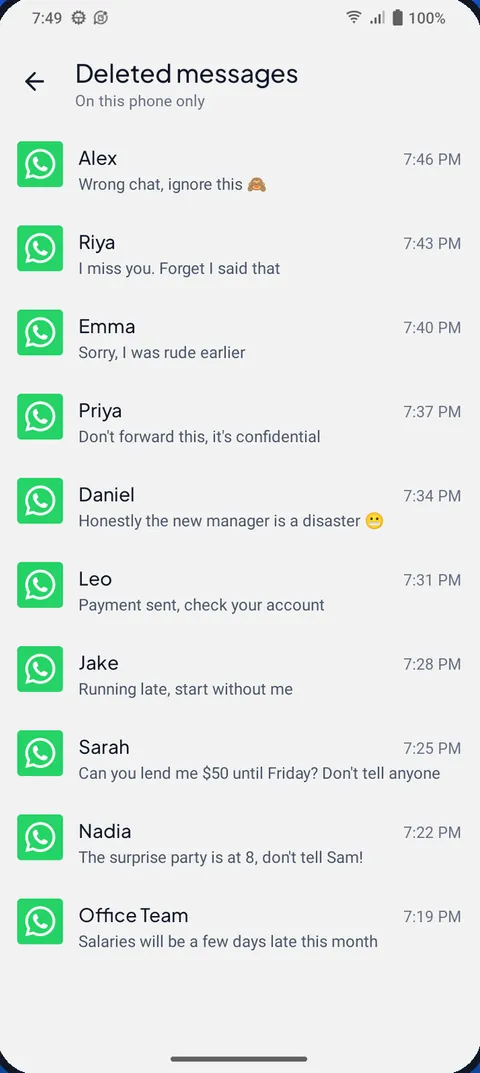
- When a chat shows “This message was deleted”, open Deleted messages in Message Alarm and read the saved copy.
It spots a deletion in two main ways: the “This message was deleted” placeholder, which it recognises in 21 languages for WhatsApp and WhatsApp Business, or one message vanishing from a chat’s notification while the others stay. The saved message is then marked deleted and listed under Deleted messages.
Our own preference is 30 days, not Lifetime. Most deleted messages are worth reading the same evening, and a permanent archive of everything people sent you is more than most of us need.
One more thing to check. Some phones close background apps to save battery, and an app that is closed saves nothing. Message Alarm’s “Fix background issues” screen walks you through setting battery use to Unrestricted and, on brands that have it, turning on auto-start. If you use an Infinix, Tecno or itel phone, see why messages only arrive when you open the app.
What can’t any app bring back?
Quite a lot, and it is better to know before you rely on it.
- Photos, videos, voice notes and files. The notification carries a label, not the file, so a saved photo shows as “📷 Photo”.
- Messages you read with the chat already open. WhatsApp does not notify for those, so nothing was there to save.
- Muted chats and groups that never send a notification. If you mute busy groups, read how to mute a group chat and keep the mentions instead of muting outright.
- Anything that arrived before you turned Save notifications on. There is no going back in time.
- Messages that arrived while the app was stopped by the phone’s battery settings.
There is also one case that trips people up. When the deleted message was the only new message in that chat, WhatsApp removes the whole notification instead of changing it. To any app, that looks exactly like you reading the chat. So Message Alarm counts it as a deletion only while the phone is locked or the screen is off. If you were using the phone at that moment, it won’t be flagged. The saved copy is still in your saved messages either way; you just won’t find it under Deleted messages.
For Messenger, Instagram, Telegram and imo, see what you can still read after a message is unsent.
Will the sender know I saw a deleted message?
No. The sender is not told. Saving a notification happens entirely on your phone and nothing is sent to WhatsApp or to the person who wrote it. The only way they find out is if you tell them, or quote the message back, which people do more often than you would think.
Is a deleted message app private?
It should be, and this is the question worth asking before any feature. An app that saves notifications sees every message you choose to save, from your partner, your bank, your boss. Where that text goes matters more than how the app looks.
In Message Alarm, your messages are checked on your phone and are never uploaded. Saved notifications stay on the phone, and verification codes are saved but hidden until you tap them. You can delete one chat, one app or everything whenever you like, and uninstalling the app deletes it all. The app does send a little technical data, such as crash reports and an anonymous install ID, but never your messages. It does not ask for contacts, SMS, call log, microphone, camera, location or files permissions, and it shows no ads.
Saved notifications, deleted messages and notification history are free and unlimited in Message Alarm, and there are no ads. The free plan’s limits are on the alarm side only: 2 watched apps, 3 app alarms a day and 15 a week, and 2 auto-replies a week. Smart Tray, Quiet mode, the spending tracker, bill reminders and the smart features are free too. It runs on Android 7.0 and later, has 100K+ downloads on Google Play, and keeps your messages on your phone.
Questions people ask
Can I see a WhatsApp message after it was deleted?
Only if your phone saved its notification before it was deleted. Android's notification history keeps the last 24 hours if you turned it on, and an app like Message Alarm can keep the text for 7 days up to lifetime once Save notifications is on.
Will the sender know I saw it?
No. The copy is saved from the notification on your own phone, and nothing is sent to WhatsApp or to the sender. They only find out if you tell them.
Can I recover deleted WhatsApp photos?
No. A notification carries the text and a label such as "📷 Photo", not the photo itself, so no notification saver can bring back photos, videos, voice notes or files.
Does it work on iPhone?
No. iOS does not let apps read other apps' notifications, so there is no iPhone version of Message Alarm and no iPhone app can save deleted WhatsApp messages this way.