
Infinix, Tecno and itel: why messages only arrive when you open the app
By the Message Alarm team · Updated · 7 min read
If messages on an Infinix, Tecno or itel phone only show up when you open the app, the phone has frozen that app in the background. Allow it in Phone Master’s Auto-start management, turn off power saving for it, and switch off the screen-off push options, and messages will come in while the phone sits in your pocket.
It has a very particular feel. Nothing for an hour, then you open the app and the phone buzzes five times in a row as everything arrives at once. The messages were never lost. They were waiting at the door for the app to wake up.
Why do messages wait until you open the app?
Infinix (XOS), Tecno (HiOS) and itel all come from the same company, Transsion, and share the same approach to battery life: stop apps hard when you aren’t using them. Don’t kill my app, an open-source site that documents these restrictions by brand, describes it on its Tecno page as an aggressive battery setting that leaves apps “completely halted, like frozen in time” until you return to them, and notes that it affects all apps across the device. There is no separate Infinix page, but Infinix and itel phones use the same Phone Master tool and the same kind of switches.
A frozen app can’t turn an incoming message into a notification. So the message sits until you open the app yourself, and then everything lands together. That is why it looks like the app is broken when the app is fine.
Which settings let apps run in the background?
Most of what matters lives in Phone Master, the preinstalled tool for cleaning, battery and security. Pick the two or three apps that must reach you and do these steps for each. The names are the ones used on recent versions; they vary by model and update.
- Open Phone Master, tap Toolbox, then Auto-start management, and allow the app. If you can’t find it, open Settings and search for “Auto-start”.
- Open Settings and search for “Power Saving Management” (on some models it is under Battery Lab › Battery Saving Settings), then turn it off for the app.
- In Phone Master’s settings (Advanced Settings on some versions), turn off Screen off push block, Screen off sleep and Screen off scheduled push if your phone has them.
- Open the app’s App info, tap Battery and set it to Unrestricted or Don’t optimize.
- Open recent apps, tap the small arrow or menu on the app’s card, and choose the lock option.
What do the Phone Master switches actually do?
Auto-start management is a list of apps with a switch each. An app that is off here can’t start itself after a restart or after the system stops it, which is the main reason for the open-the-app-to-get-messages pattern. Don’t kill my app’s advice for this list is short: enable all of them. We’d be more selective and allow only apps that need to reach you, but it shows how much this one list matters.
The screen-off options are the next suspects. Going by their names, Screen off push block, Screen off sleep and Screen off scheduled push all hold apps or their incoming pushes back while the screen is dark, which is exactly when you need a message to get through. Don’t kill my app recommends turning all three off, and for a chat or bank app we agree.
Then there is Sleep Mode Optimization, the one that is easy to miss. According to Don’t kill my app it turns on airplane mode at night when you aren’t using the phone. No setting on any app can beat airplane mode. If night messages never arrive but day messages do, check this first.
Two smaller ones. Power Marathon is an extra saving mode, and Don’t kill my app suggests turning off its Power Boost. App Booster lets you add a short list of apps (it reports a limit of four) that get extra protection, which is a good home for your main chat app.
Should you stop using Phone Master’s cleaner?
Mostly, yes. The big clean or boost button closes apps to free memory, and on these phones a closed app often stays closed until you open it again. Tapping it every morning quietly undoes the work above. Our opinion is that the memory you free is not worth the messages you lose, and Android handles memory well enough on its own. If you like the cleaner, at least lock your important apps in recent apps first, since locked apps are skipped.
To lock an app, open recent apps, tap the small down arrow or menu at the top of its card, and choose the option with the lock icon.
How do you test it in a minute, and then overnight?
Lock the phone and leave it face down. From another phone, or the app’s web version on a computer, send yourself a message. It should arrive within a few seconds, without you touching anything.
A one-minute test can’t catch Sleep Mode Optimization or screen-off sleep, which only act after a while. So do the real test that evening: leave the phone untouched for an hour or more, then have someone message you. If it arrives while the screen is still dark, you have fixed it.
What if messages still arrive late?
Check the plain causes too: Do Not Disturb, a muted chat, or the app’s own notification switches. If those are fine, it helps to see what the phone actually let through.
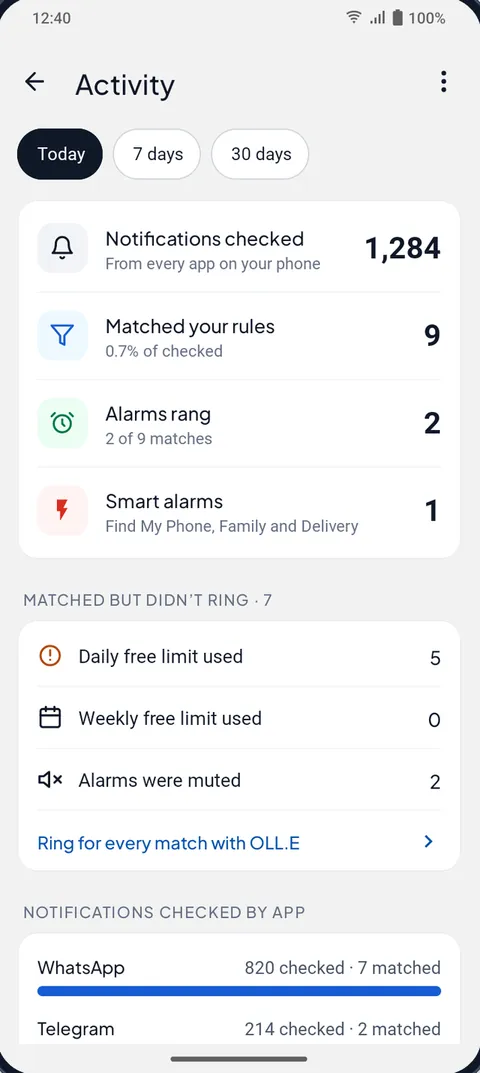
Message Alarm keeps an Activity screen with every notification it checked, the ones that matched your rules, the ones that rang and why a match didn’t ring (a daily or weekly limit, alarms muted, another alarm already ringing). If a message you know was sent isn’t listed at all, it never reached Message Alarm, which means the phone is still holding apps back. With Smart Tray on, Home shows a warning when Android paused Message Alarm for 30 minutes or more, such as “Smart Tray was paused 3 h last night. Android stopped Message Alarm. Nothing was lost.”
On Infinix, Tecno and itel, Message Alarm’s “Fix background issues” card has an Auto-start item that opens Phone Master’s auto-start list for you, plus a Battery item for setting its battery use to Unrestricted. Android doesn’t tell apps whether auto-start is on, so it asks “Is auto-start on?” and takes your word for it.
Do the same settings help chat, email and banking apps?
Yes. WhatsApp, an email app, a bank, a delivery app or a doorbell camera all hit the same wall, and they all come back to life with the same switches. Do the steps once per app you rely on. If you want a record of when each notification actually arrived, so you can tell whether the fix worked, see notification history on Android.
| Setting | Where on Infinix, Tecno and itel | What it does | Set it to |
|---|---|---|---|
| Auto-start management | Phone Master › Toolbox | Lets an app start itself after it was stopped | On for the app |
| Power Saving Management | Settings › Battery Lab › Battery Saving Settings | Limits apps to save power | Off for the app |
| Screen off push block, sleep, scheduled push | Phone Master settings | Hold back apps and pushes while the screen is off | Off |
| Sleep Mode Optimization | Phone Master settings | Turns on airplane mode at night when the phone is idle | Off if you need night messages |
| App Booster | Phone Master | Gives a few chosen apps extra protection | Add your main chat app |
Other brands do the same thing under other names. See the Xiaomi Autostart fix, Samsung’s Never sleeping apps and the Vivo, Oppo and Realme settings.
When messages arrive on time, Message Alarm can turn the important ones into a loud alarm that rings even on silent, for messages from people you name or with words you choose, like an SMS alarm for a single sender. The free plan includes 2 watched apps, 3 app alarms a day and 15 a week, and 2 auto-replies a week. Smart Tray, Quiet mode, saved and deleted messages, history, spending, bills and the smart features are free and unlimited. It has no ads, and your messages are checked on your phone and never uploaded.
Questions people ask
Why are my notifications late on Infinix, Tecno or itel?
The phone freezes apps in the background to save battery, so a message waits until you open the app. Allowing the app in Phone Master’s Auto-start management and turning off power saving for it lets messages arrive on time.
How do I stop Infinix, Tecno or itel from closing apps?
Open Phone Master › Toolbox › Auto-start management and allow the app, turn off Power Saving Management for it, and switch off the screen-off push options. Lock the app in recent apps and skip the one-tap cleaner.
Does this drain my battery?
A little, for a few apps that mostly wait for messages. Allowing every app is what costs battery, so keep the list to the apps that must reach you.
Do I need to do this after every update?
Not every time, but big system updates can reset these switches. If messages start waiting for you again, check Auto-start management and the screen-off options first.