
Bill reminders that find the due date for you (cards, EMIs, utilities)
By the Message Alarm team · Updated · 6 min read
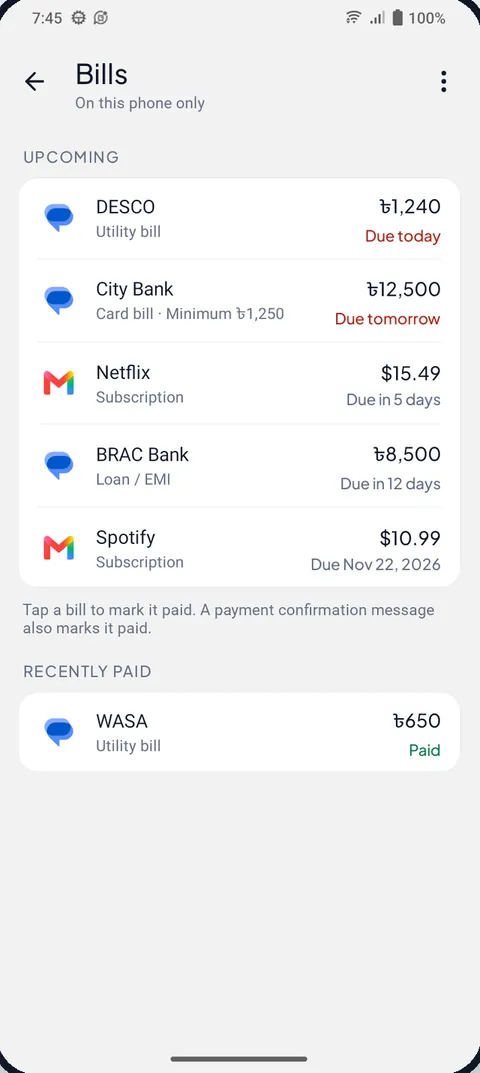
An Android app can find your credit card due dates for you. Message Alarm reads the bill messages you already get (card statement SMS, loan and EMI alerts, biller app notifications, Gmail notifications for e-bills), picks out the amount and the due date, and reminds you 2 days before and again on the day. You never type a date in.
It is free, it works on the phone, and it doesn't pay anything for you. It only reminds.
Why do calendar reminders fail for bills?
A repeating calendar event knows one thing: a day of the month. Bills know three, and they change.
The due date can drift with the billing cycle. The amount is different every month, and with a credit card there are two amounts, the total and the minimum. A calendar alert saying "Pay card" tells you neither. Worse, it fires whether or not you have already paid, so within a few months you learn to swipe it away without reading. That is the habit that causes the late fee.
Our view, and some people will disagree: a reminder you have trained yourself to dismiss is worse than having no reminder at all, because it gives you the feeling of being organised. A reminder that only appears when a real, unpaid bill is coming up, with the amount on it, is the one you actually read.
How does it find bills in bank, biller and email notifications?
Bill reminders read due dates and amounts from bank, card, biller and email notifications that reach your phone. A card statement message might read something like this:
Your card statement is ready. Total due 12,450.00, minimum due 1,250.00. Please pay by 15 Nov.
From that, the app records a card bill with its minimum due, the total and the date. The kinds of bills it recognises are:
- credit card bills, with the minimum due shown alongside the total
- loan and EMI instalments
- subscriptions
- auto-debits, where the money will be taken automatically
- utility bills such as electricity, gas, water or internet
That auto-debit line is easy to overlook. Nothing needs paying, but the reminder is really telling you to have enough in the account on that day, which is when a bounced debit costs you.
Email works through the notification too. When Gmail shows a notification for a new e-bill, the app reads what that notification says. It never signs in to your email and can't open your inbox, so an email that arrives silently (notifications off, or a label that doesn't notify) is not seen. The same rule covers SMS: the app has no SMS permission and doesn't read your SMS inbox, only messages as they arrive.
Chats with people are never read for bills. A friend reminding you about money you owe them stays a chat.
When do the reminders come?
Twice for each bill: 2 days before the due date, and on the due date itself. Two days is enough to move money between accounts or wait for a salary to land. The second reminder is for everyone who meant to do it yesterday.
How do I mark a bill as paid?
Tap the bill and choose I've paid. One tap and the remaining reminders stop.
Often you won't need to. When your bank sends a payment confirmation for that bill, the app reads it and marks the bill paid on its own. So the usual flow is: the statement arrives, a reminder comes two days before, you pay, the bank confirms, and the bill moves out of the way without you touching it.
What if it finds something that isn't a bill?
Banks send a lot of messages with dates and amounts in them, and a few will be misread. Tap the entry and choose Not a bill. It disappears and you won't be reminded about it. If you ever want to start fresh, you can delete all bills at once.
Why didn't my bill show up?
Almost always because the message never became a notification while the app was watching. Work through these in order:
- Did the bill arrive before you turned reminders on? Then it was never seen. Wait for next month's statement.
- Is the bank's SMS conversation muted in your messaging app, or are that app's notifications off? A muted message may never show a notification, and the app can't read what wasn't shown.
- For e-bills, is Gmail set to None, or is the email going to a label that doesn't notify? Check the Gmail step in the set-up below.
- Did the message actually say when the bill is due? Some banks send a short "your statement is ready" with no date and put the details in an email or the bank's app. If the date is nowhere in a notification, there is nothing to read.
- Did Android stop Message Alarm in the background? Phones that save battery hard can do this. The battery step below is the fix.
If you find a bill that will never send a message, put it in a calendar and stop worrying about it. Not everything needs to be automatic.
Bill reminder app, calendar or automatic: which is better?
It depends how many bills you have and how they reach you. Here is the honest comparison:
| Question | Calendar repeat event | Manual bill reminder app | Message Alarm bill reminders |
|---|---|---|---|
| Who enters the due date | You, once | You, for each bill | Read from the bill message |
| Knows this month's amount | No | If you type it | Yes, from the message (with the minimum due for cards) |
| Knows you paid | No | When you mark it | When you tap I've paid, or from the payment confirmation |
| Bills with no message (paper, rent to a landlord) | Yes | Yes | No |
| Works on iPhone | Yes | Depends on the app | No, Android only |
That fourth row matters. Rent paid to a person, school fees on a paper slip, a bill that only lives on a website: none of these send a message, so an automatic reminder can't know about them. For those, a manual app such as Bills Reminder or a plain calendar entry is still the right tool. Use both if you need to; they don't get in each other's way.
How do I turn on automatic bill reminders?
- Install Message Alarm from Google Play and allow Notification access.
- Turn on Bill reminders in Message Alarm. They stay off until you do.
- Keep notifications on for your SMS app and for your bank, card and biller apps.
- If bills reach you by email, open the Gmail app, tap Menu, then Settings and your account, and check that Email notifications is not set to None.
- Open Fix background issues and set battery use to Unrestricted.
- When your next statement or bill message arrives, open the Bills screen and check it is listed with the right due date.
Your messages are checked on your phone and are never uploaded. Bills and their reminders are stored on the phone, there are no ads, and the app doesn't ask for SMS, contacts, location or file permissions.
The same messages can do more. The spending tracker adds up what you spent from bank and wallet messages, with guides for UPI in India and bKash and Nagad. If you run a shop, incoming payments can be read out loud at the counter.
Message Alarm is a free Android app that rings a loud alarm, even when your phone is on silent, when an important message arrives from a person or with a word you choose. Bill reminders are free and unlimited, as are the spending tracker, Smart Tray, Quiet mode, saved and deleted messages, notification history and the smart features. The free plan only limits alarms: 2 watched apps, 3 app alarms a day and 15 a week, and 2 auto-replies a week. No ads.
Questions people ask
Is there an app that reminds me of credit card due dates automatically?
Yes, on Android. Message Alarm reads the due date and amount from your card's statement message as it arrives and reminds you 2 days before and on the due date. You don't enter anything, but it only sees bills that arrive after you turn it on.
Will it pay my bills?
No. It only reminds you. You pay through your bank or biller as usual, then tap I've paid, or let the bank's payment confirmation mark the bill paid.
Which bills can it find?
Credit card bills with the minimum due, loan and EMI instalments, subscriptions, auto-debits and utility bills, as long as a bank, card, biller or email notification tells you about them. Bills that never send a message, such as rent paid to a person, are not found.
Does it read my email?
Only the email notifications that reach your phone, such as Gmail's. It never signs in to your email and cannot open your inbox, so an email that arrives without a notification is not seen.