
An expense tracker that reads your bank messages: no typing, no bank login
By the Message Alarm team · Updated · 7 min read
Yes, an Android app can add up your spending from the messages your bank already sends, with no typing and no bank login. Message Alarm's spending tracker reads bank SMS, card alerts and wallet app notifications as they arrive on your phone, then shows what you spent and received. One trade-off comes first, because it decides whether this suits you: the app has no SMS permission and never opens your SMS inbox, so it only counts messages that arrive after you switch the tracker on. Last month is not imported.
Some people will find that a deal-breaker. Others will be glad a money app never asked for years of their private texts. Both reactions are fair, and the rest of this page should help you decide which camp you are in.
How does an expense tracker read bank messages without your inbox?
Through the notification, not the inbox. When your bank texts you, your messaging app puts a notification on the screen. When a wallet or banking app confirms a payment, it does the same. Message Alarm already has Notification access (it needs it to ring alarms), so it sees that notification the moment it appears. It picks out the amount, the currency and where the money went, and writes one line into a small database that lives on the phone.
You don't type anything. You don't sign in to anything. Your messages are checked on your phone and are never uploaded.
This only works on Android. iOS does not let one app read another app's notifications, so there is no iPhone version of Message Alarm, and no iPhone app can track spending this way.
What does it count, and what does it ignore?
The tracker looks for money messages from banks, cards and wallets. In practice that means the SMS your bank sends after a card purchase or a debit, and the notifications from wallet and payment apps such as bKash, Nagad, PhonePe, Google Pay or Paytm. Each one is filed under a type:
- card purchase
- transfer
- cash out
- bill & recharge
- debit, for the plain "your account was debited" kind of message
- received, for money that came in
What it leaves alone matters just as much. A friend writing "sent you 500" in a chat is not a bank message, so it isn't counted. Nothing is counted while the tracker is off.
If your money moves mostly through bKash and Nagad, the bKash and Nagad guide goes through those wallets one by one. In India, tracking UPI spending covers Google Pay, PhonePe and Paytm.
What will I see: spent, received, by day, where it went?
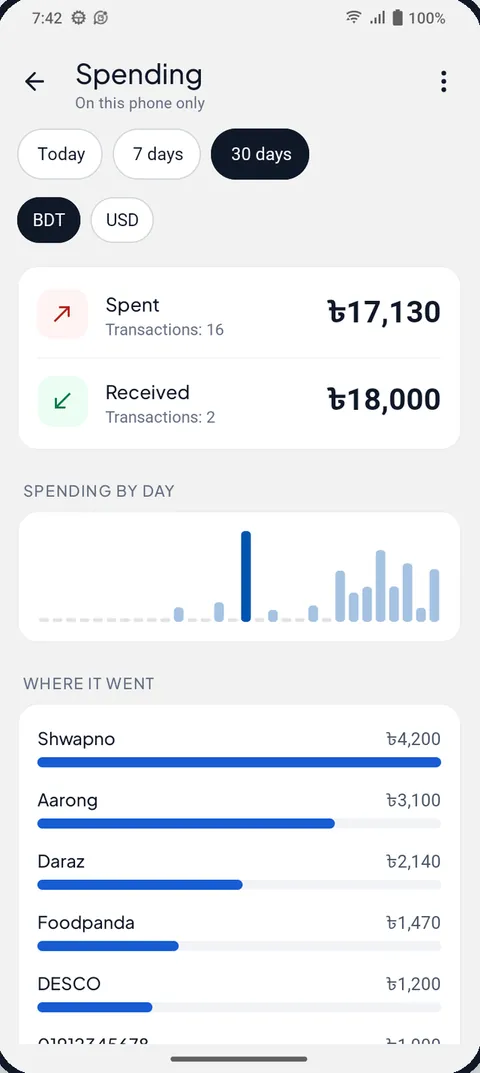
The main screen shows two totals, spent and received, for the period you are looking at. Under them you get the same money cut different ways: by day, by where it went (the shop or person named in the message), by what you paid from (which card, bank or wallet), and by type. A list of recent transactions sits at the bottom so you can check any total against the messages behind it.
Trends compare the period with the one before it, which is the view we find most useful. "You spent more on transfers than last month" is a nudge you can act on. A pie chart of categories rarely is.
If money reaches you in more than one currency, say a taka account and a dollar card, you get a separate total for each currency, such as "৳12,400 + $35", instead of one meaningless mixed number. Nothing is converted, because there are no exchange rates on the phone. The tracker reads bank and wallet messages from about 30 countries, each in its own number format, so "1.250,00 €" and "KWD 12.500" are read as the amounts they are.
The same card and biller messages can also remind you before a bill is due, which is a separate switch. And if you sell things, incoming payments can be spoken out loud at the counter.
What if it reads a message wrong?
It will, now and then. Banks word their messages in a hundred ways, and a tracker that reads text can misjudge one. When an entry is not a real payment, open it and tap Not a transaction? It leaves your totals. If you ever want a clean slate, Delete all wipes the tracker's data.
What can a message-based tracker never see?
Cash, first of all. Banknotes from your pocket leave no message, so a market run paid in cash simply doesn't exist for the tracker. If most of your money moves as cash, a manual app where you type each expense will serve you better, and we would say that even though this page is about the other kind.
Then there are past months. With no SMS permission, the app can't look back through your inbox, so the first day of data is the day you turn it on. A bank that sends no message for a payment is invisible too, and so is any message that never became a notification: if you blocked your SMS app's notifications, or Android stopped Message Alarm in the background, that payment is missed.
Our opinion: starting from today is fine. The point of tracking is to change what you spend next month, not to audit three years of history, and a few weeks of honest data shows the pattern clearly enough.
Is it safe to let an app read your bank messages?
It is a reasonable worry, so here is exactly what happens. The spending data, like everything Message Alarm reads, stays on the phone. Your messages never leave your phone. There are no ads and the data is not sold. The app does send a little technical data (a push token, an anonymous install ID, country, time zone, alarm counts, app usage events through Firebase Analytics and crash reports), and we would rather say so than claim nothing ever leaves.
It never asks for your bank login, your PIN or your balance. It only needs the amount written in each message. It also doesn't ask for SMS, contacts, call log, microphone, camera, location or file permissions. Notification access is what makes the tracker work, and you can switch it off in Android's settings at any time (open Settings and search for "Notification access").
Manual, SMS-reading or notification-reading: which tracker suits you?
There are roughly three ways an expense app gets its numbers. You type them. The app reads messages already saved in your phone. Or it watches new messages as they come in. Linking a bank account through a login is a fourth route in some countries, and the one this page set out to avoid.
| Approach | Where the numbers come from | Past months | What it needs from you |
|---|---|---|---|
| Manual budget app | You type every expense | Only what you typed | Time, every day |
| App that reads saved SMS | Messages already in your SMS inbox | Often, if the messages are still there | SMS permission |
| Message Alarm | Bank SMS and wallet notifications as they arrive | No, it starts the day you turn it on | Notification access |
If you are comparing named apps, here is what Google Play itself says about two common choices and about Message Alarm:
| App | Downloads | Ads | In-app purchases |
|---|---|---|---|
| PennyWise: SMS Expense Tracker | 5K+ | No | Yes |
| Bluecoins Finance & Budget | 1M+ | Yes | Yes |
| Message Alarm | 100K+ | No | No |
A dedicated budgeting app will give you budgets, goals and categories that Message Alarm doesn't try to offer. If you want a quiet running total from the messages you already get, without handing over a login, the tracker covers that.
How do I turn on the spending tracker?
- Install Message Alarm from Google Play and allow Notification access when the app asks for it.
- Open the spending tracker in Message Alarm and turn it on. It stays off until you do.
- Check that your SMS app and your bank and wallet apps are allowed to show notifications.
- Open Fix background issues in the app and set battery use to Unrestricted (Don't optimize on some phones).
- Make your next card or wallet payment, then look for it under recent transactions.
Bank SMS arrive without mobile data, so card purchases are counted even when you are offline. Wallet app notifications need the phone online, same as the wallet itself.
Message Alarm is a free Android app that rings a loud alarm, even when your phone is on silent, when an important message arrives from a person or with a word you choose. The spending tracker is free and unlimited, and so are bill reminders, Smart Tray, Quiet mode, saved and deleted messages, notification history and the smart features. The free plan only limits alarms: 2 watched apps, 3 app alarms a day and 15 a week, and 2 auto-replies a week. No ads.
Questions people ask
Can an app track expenses from SMS?
Yes, on Android. Message Alarm's spending tracker reads bank SMS and wallet app notifications as they arrive and adds up what you spent and received. It has no SMS permission and does not read your SMS inbox, so it only counts messages from the day you turn it on.
Is it safe to let an app read bank messages?
With Message Alarm, the messages are checked on your phone and never uploaded, there are no ads and the data is not sold. It needs Notification access, which you can switch off at any time, and it never asks for your bank login, PIN or balance.
Does it need my bank login?
No. The tracker only reads the amount and details written in the messages your bank and wallets already send you. You never sign in to a bank or share an account number.
Does it work with wallet apps?
Yes. It reads notifications from wallet and payment apps such as bKash, Nagad, PhonePe, Google Pay and Paytm, as well as bank SMS. The wallet has to show a notification for the payment, and cash is never seen.