
MetaTrader alerts that ring on silent (MT4 and MT5 on Android)
By the Message Alarm team · Updated · 7 min read
MetaTrader push alerts reach your Android phone as ordinary notifications, so they play one short sound and stay silent when the phone is on silent or vibrate. To make an MT4 or MT5 alert ring through silent mode, let a notification alarm app watch the MetaTrader app and turn the alerts you choose into a real alarm on Android’s alarm stream.
You need two things working first: MetaTrader pushes arriving on the phone, and a phone that doesn’t delay them. This guide covers both, on Android. (On iPhone, apps can’t read other apps’ notifications, so the alarm half isn’t possible there.)
How do I set up MT4 or MT5 push notifications with a MetaQuotes ID?
A MetaQuotes ID is the code that links your phone to your desktop terminal, so alerts created on the computer can be pushed to the phone. The steps are roughly the same in MT4 and MT5, though the screen names shift a little between versions.
- Install MetaTrader 5 or MetaTrader 4 on your phone and log in.
- Find your MetaQuotes ID in the mobile app. It sits in the messages or settings area, depending on version.
- On the desktop terminal, open Options and go to the Notifications tab. Switch on push notifications and paste the ID.
- Create or edit an alert and choose notification as its action. Expert Advisors and indicators can send pushes too, if they were written to.
If an alert never reaches the phone, check first that the desktop terminal holding that alert was running when the price got there.
Why is a MetaTrader push so easy to miss?
Because it is built like every other notification. One short chime at notification volume, a line in the bar, and that is it. Silent mode mutes it completely.
That is fine during the day with the phone on the desk. It is not fine at 3 AM when gold moves through your level, or in a meeting with the phone face down. A push you hear twenty minutes late is a push you didn’t get.
How do I turn MetaTrader alerts into an alarm?
Message Alarm is a free Android app that rings a loud alarm, even when your phone is on silent, when an important message arrives from a person or with a word you choose. MetaTrader’s pushes count as messages here: it reads the notification text and rings when your words appear.
- Install Message Alarm, allow Notification access, and allow Display over other apps for the full-screen alarm card.
- Add MetaTrader 5 (or MetaTrader 4) as a watched app.
- Under Message contains, type the words that should ring: a symbol name such as EURUSD or XAUUSD, or a tag you put in your alert text, like WAKE.
- Set the alarm volume, how many times it rings (1 to 10), and vibration or the flashlight if you want them.
- Fire a test alert from the terminal with the phone on silent and the screen locked, and check that it rings.
The tag trick is the one we would use. You write the alert text yourself, so add a word like WAKE to the two or three alerts that genuinely matter and leave the rest untagged. They still arrive as normal pushes. Only the tagged ones ring. An alarm for every tick of every pair teaches you to ignore the alarm, which is worse than having none.
A few details. Keywords match whole words and ignore capital letters. If your broker adds a suffix to symbol names, type the symbol exactly as it appears in the notification. And only one alarm rings at a time; a match that arrives while another alarm is ringing is logged as “Not rung · alarm already ringing”.
When it rings, the screen turns on and a full-screen card shows the alert text with Dismiss and Open buttons. Open takes you straight into MetaTrader. If you don’t stop it, a “You missed an alarm from MetaTrader 5” notification stays on the phone so you know something fired.
Can broker SMS, like a margin call, ring as well?
Yes, if your broker sends them. Some brokers send SMS or app notifications for margin calls, stop outs or filled orders. Add your SMS app as a second watched app and use words such as “margin”, “stop out” or “filled”, or put the broker’s sender name under Only alarm for.
Message Alarm does not read your SMS inbox and has no SMS permission. It sees a text the moment it arrives as a notification, the same as a push. Older texts are not looked at.
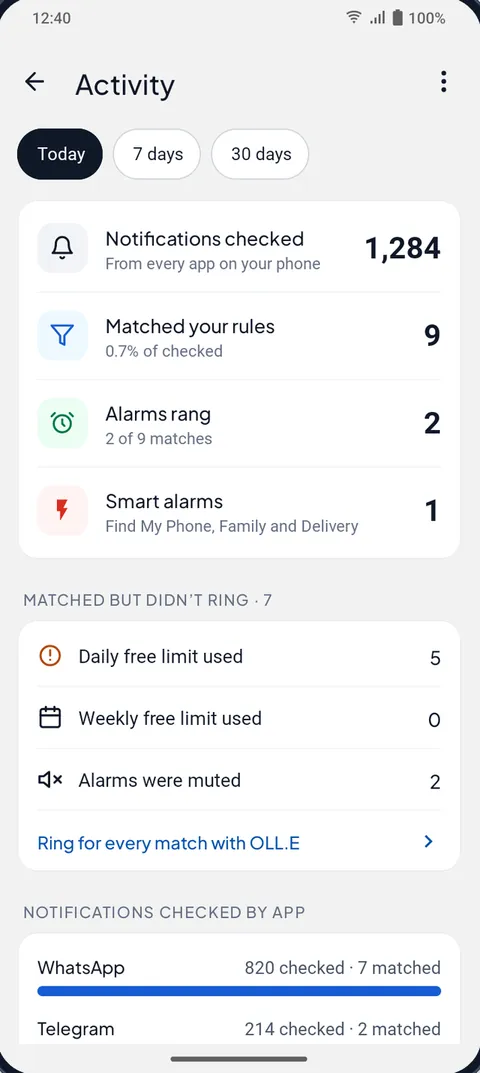
On the free plan that is both of your watched apps used: MetaTrader and SMS. That is a reasonable pair for most people. The free plan also allows 3 app alarms a day and 15 a week. On a volatile day you can use those up, and anything over the limit shows in the Activity screen as a match that didn’t ring, with the reason. Another argument for tagging only the alerts you would get out of bed for.
Can it ring only during the sessions I trade?
Yes. Turn on Only during set hours and pick the window. Overnight windows work, so 10 PM to 7 AM is fine if you follow a session that runs while you sleep. Set Repeat to Custom days and leave out Saturday and Sunday, or choose Once if you only want one alarm for a single event; the rule switches itself off after it rings.
There is also Auto-mute after an alarm. After a ring, Message Alarm stays quiet for a time you choose, until you unmute, or never. On a choppy night when price keeps crossing the same line, a short mute stops the phone from ringing every few minutes.
If you want the alarm itself to be harder to sleep through, our guide to a loud message alarm for heavy sleepers goes through volume, rings and the flashlight.
Why do MetaTrader pushes sometimes arrive late?
Usually because the phone put MetaTrader to sleep. Many Android phones limit apps in the background to save battery, and a limited app may get its push late. Open Settings, search for “Battery”, find MetaTrader, and set its battery use to Unrestricted or “Don’t optimize”, whichever your phone offers. Do the same for Message Alarm; its “Fix background issues” screen takes you to the right place and to auto-start on brands that have it.
Xiaomi and Samsung have extra layers here. See why Xiaomi notifications are delayed and Samsung’s never sleeping apps list.
MT5 push alone, or push plus an alarm?
| What you get | MetaTrader push alone | Push plus Message Alarm |
|---|---|---|
| On silent or vibrate | Muted | Rings, on the alarm stream |
| How loud and how long | One short sound at notification volume | Alarm volume you set, 1 to 10 plays |
| Screen | A line in the notification bar | Screen turns on, full-screen card |
| Pick which alerts are loud | Only by which alerts you create | By symbol or by a word in the alert text |
| Only certain hours | No schedule of its own | Only during set hours, Custom days |
| Speed | As fast as the push arrives | The same; it can’t speed up a late push |
| Watches prices | Your terminal does | No; it reads the notification only |
For anything that protects money, the protection belongs on the platform: stop orders and sensible position size. An alarm is for your attention, so you can look and decide. Treat it that way and it does its job well.
If you want to widen the net beyond MetaTrader, the same keyword rules work on email, chat and bank apps; see keyword alerts on Android.
Message Alarm is free, with no ads and no in-app purchases. The free plan covers 2 watched apps, 3 app alarms a day and 15 a week, and 2 auto-replies a week; daily alarms reset at midnight and weekly ones every Monday. Smart Tray, Quiet mode, saved and deleted messages, notification history, spending, bill reminders and the smart features are free and unlimited. Your messages are checked on your phone and never uploaded. It runs on Android 7.0 and later.
Questions people ask
How do I make MT5 alerts louder?
Android plays a MetaTrader push once at notification volume, and silent mode mutes it. Message Alarm can watch the MetaTrader app and ring an alarm on the alarm stream for the alerts whose text contains your words, at the volume you set, 1 to 10 times.
Can an MT5 alert wake me up?
Yes, if the push reaches your phone and Message Alarm is set to ring for it. Give it an overnight window with Only during set hours, set battery use to Unrestricted for both apps, and test it once with the phone on silent and locked.
Does it work with MT4?
Yes. Message Alarm works with any app that shows a notification, so you can add MetaTrader 4 as a watched app the same way as MetaTrader 5.
Is it fast enough for trading?
It reacts when the MetaTrader notification appears on your phone, but it cannot make a late push arrive sooner. It reads notifications only and does not watch prices, so keep your protection on the platform with stop orders.