
Telegram message alarm: make one chat ring on silent (Android)
By the Message Alarm teamUpdated 6 min readAlarms for important messages
Telegram can’t ring through silent mode by itself: its notification sound plays at notification volume, and silent or vibrate turns that off. To make one person’s message, or any message with a word like “urgent”, ring like an alarm, you need an app that listens to Telegram’s notifications and plays a real alarm when one matches.
Everything below is for Android. On an iPhone, apps can’t read other apps’ notifications, so this kind of alarm isn’t possible there.
Can Telegram ring when my phone is on silent?
Not on its own. A Telegram message is an ordinary notification, and Android treats ordinary notifications the same way whichever app sent them. Silent mode mutes them. Vibrate mode buzzes once. Do Not Disturb holds them back unless you’ve made an exception for Telegram.
Alarms are different. Android plays them on a separate audio stream, the one your morning alarm uses, and that stream keeps sounding when the phone is set to silent. So the trick isn’t to make Telegram louder. It’s to turn the right Telegram message into an alarm.
What can Telegram’s own settings do, and where do they stop?
Quite a lot, for sorting. Telegram’s notification settings let you mute a chat, mute a group for a while, or give a single chat its own sound through per-chat exceptions. Exact names move between versions, so open a chat, tap its name, and look for the notification options there, or browse Telegram’s settings. The Telegram FAQ is the place to check what the current app offers.
Where they stop is the volume, and the condition. A custom tone for your partner’s chat is still:
- one short sound, played once;
- at notification volume, which silent mode sets to zero;
- tied to the chat, not to what the message says.
Android adds its own layer. Open Settings > Apps > Telegram > Notifications and you’ll usually see Telegram’s notification categories, each with its own sound and importance. Some phones also let you mark a conversation as priority. None of that makes Telegram ring on silent, and none of it can tell “are you awake?” from “the server is down”.
How do I make one Telegram chat ring like an alarm?
Message Alarm is a free Android app that rings a loud alarm, even when your phone is on silent, when an important message arrives from a person or with a word you choose. You set it up once for Telegram, and from then on matching messages ring while everything else stays as quiet as you left it.
- Install Message Alarm and allow Notification access. Allow Display over other apps too, so the full-screen alarm card can show.
- Add Telegram as a watched app.
- Under Only alarm for, type the person’s name exactly as Telegram’s notification shows it. Or leave names empty and add words under Message contains.
- Pick a tone, the alarm volume and how many times it rings, from 1 to 10.
- Put the phone on silent and ask that person to send you a test message.
When a match arrives, the screen turns on and a card shows who wrote and what they said, with Dismiss and Open buttons. If you sleep through it, a “You missed an alarm from Telegram” notification waits for you. Our guide to ringing on silent for certain contacts covers the same idea across SMS and other chat apps.
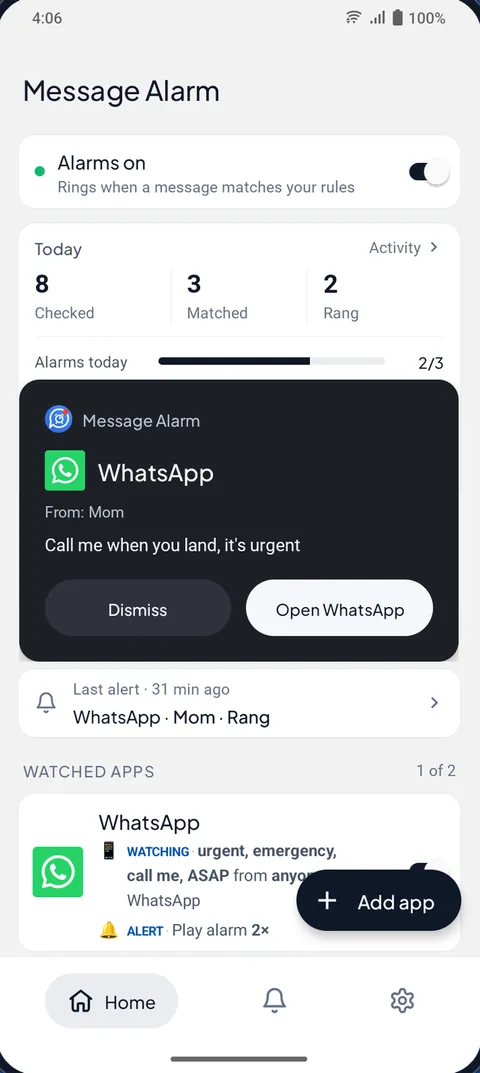
Two settings are worth a minute. Only during set hours lets you limit the alarm to, say, 10 PM to 7 AM, when you really are asleep; overnight windows work. Repeat decides whether the rule runs every day, on chosen days, or just once, after which it switches itself off. “Once” is handy for the night you’re waiting on a single reply.
The sound itself is yours to choose. Pick any audio file and trim it to 30 seconds, so a voice note that says “it’s Dad” can be the alarm. Each play lasts at most 30 seconds, and you decide whether it repeats up to ten times. Prefer something quieter? Turn on vibrate only, or let the flashlight flash, which is useful in a meeting room where any sound would be too much.
Can it ring for one person in a Telegram group, or for one word?
Yes, and this is where it beats Telegram’s per-chat settings. Inside a group, Message Alarm looks at who actually sent the message, never at the group’s name. Put your manager’s name under Only alarm for and the alarm rings when she posts in the team group, not when the other forty people do. You can’t use the group name as the trigger, though; if a group should ring for anyone, use words instead.
Words work through Message contains. They match whole words, ignore capital letters and accents, and work in Bangla, Hindi, Arabic and other scripts. A short list goes a long way:
- “urgent”, “emergency”, “ASAP” for family or work groups;
- “down”, “outage”, “blocker” for a team’s alert chat;
- your own name, if people tag you by name rather than with @.
For channels, words are the safer handle. A post in a busy channel can be worth waking for when it says “cancelled” or “gate change”, and nothing else is. Our keyword alerts guide has longer lists, and muting a group but keeping mentions handles the opposite problem: groups that are too loud.
Telegram setting, Do Not Disturb or an alarm app?
| What you want | Telegram’s settings | Do Not Disturb exception | Message Alarm |
|---|---|---|---|
| A different sound for one chat | Yes, per-chat exceptions | No | Your own alarm tone, trimmed up to 30 seconds |
| Ring when the phone is on silent | No | No, silent still mutes it | Yes, on the alarm stream |
| Get through Do Not Disturb | No | Yes, for the whole app on most phones | Yes, when alarms are allowed (the Android default) |
| Ring for one person inside a group | No | No | Yes, by sender name |
| Ring only for a word like “urgent” | No | No | Yes, with Message contains |
| Ring only at night | No | Through Do Not Disturb’s schedule | Yes, with Only during set hours |
If all you need is to hear Telegram while Do Not Disturb is on, an exception may be enough, and our guide to letting one app through Do Not Disturb shows how. We’d still pick an alarm for anything that must wake you. An exception lets the normal sound through; it doesn’t make that sound any louder.
Why would a Telegram alarm ring late?
Usually because Telegram’s notification arrived late. The alarm can only react to what Android shows, so if your phone holds Telegram back in the background, the alarm waits too. Brands that are strict about battery, such as Xiaomi, Vivo, Oppo, Realme, Infinix and Tecno, are the usual suspects.
Message Alarm’s Fix background issues screen sets battery use to Unrestricted and opens auto-start where your phone has it. Do the same for Telegram itself. The free alarm limits matter as well: when the daily limit is used, matches still show in Activity but don’t ring. If a rule fires all day, narrow it rather than hitting the limit at noon.
On the free plan, Message Alarm watches 3 apps and rings up to 7 app alarms a day and 35 a week; daily alarms reset at midnight and weekly ones on Monday. It also has an optional auto-reply, 2 a week free. Smart Tray, saved and deleted messages and notification history are free without limits. Your messages are checked on your phone and never uploaded. It needs Android 7.0 or later.
Questions people ask
How do I set an alarm for a Telegram message?
Telegram has no alarm setting. On Android, an app that reads notifications, such as Message Alarm, can play a real alarm when a Telegram message comes from a person you name or contains a word you choose.
Why doesn't Telegram make a sound when my phone is on silent?
Telegram's sound is a normal notification sound, and silent mode turns notification volume off for every app. Alarms play on a separate audio stream, which is why an alarm can still be heard.
Can one person in a Telegram group trigger the alarm?
Yes. Message Alarm checks who actually sent a group message, so naming that person under Only alarm for rings only for their posts. The group's name itself can't be used as a trigger.
Will it ring through Do Not Disturb?
Yes, when Do Not Disturb allows alarms, which is the Android default. If you've set Do Not Disturb to block alarms too, it is blocked as well.