
The AI bubble, AI fatigue and the messages that still matter on your phone
By the Message Alarm teamUpdated 8 min readA clean notification bar
The AI bubble is the question many analysts are asking in November 2026: has the money poured into artificial intelligence run far ahead of what it earns? Whatever the answer, your phone already lives inside the boom. More apps add AI features, AI assistants and agents that all send notifications, and the one message from a person who needs you is easier than ever to miss.
This post looks at what was said about the AI bubble this month, what AI fatigue is, and why we built Message Alarm to do one plain job: ring loudly for the people and words you choose, and leave the rest alone. It is an Android app; iPhones don't let apps read other apps' notifications.
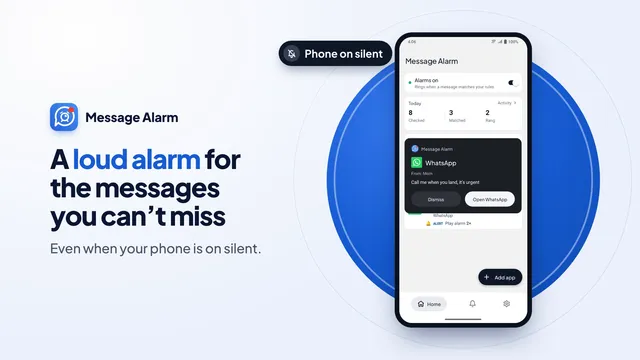
What the video shows
- A loud alarm for the messages you can't miss, even when your phone is on silent.
- The problem: on silent, or buried in a noisy notification bar, the message that matters slips by.
- You choose the apps to watch, the people (like Mom or your boss) and the words (like "urgent" or "ASAP").
- The alarm rings even on silent. A full-screen card shows who sent it and what they said, with vibration, the flashlight and your own tone.
- Smart Tray keeps what matters in the notification bar. Promotions wait in an Inbox, digests arrive at times you choose, and busy groups alert only on @mentions.
- Quiet mode keeps the phone silent, except chats with people, @mentions and urgent words.
- Deleted messages: read a message after the sender deleted it, if it arrived as a notification while saving was on. Text only.
- Notification history: every notification saved and searchable by app, person or word, kept from 7 days to a lifetime.
- Spending totals from bank and wallet notifications, one per currency, and bill reminders 2 days before the due date. No bank login.
- Smart features, free and unlimited: Find My Phone, Payment Soundbox, Read aloud, Rider arrival alarm and Family mode.
- An automatic reply lets the sender know you saw the message, in chat apps with quick reply.
- Your messages are checked on your phone and never uploaded.
- Message Alarm: a loud alarm for the messages you can't miss. Free on Android, on Google Play.
In short, the film shows a phone on silent with a noisy notification bar, then a rule for Mom, the boss and words like urgent, then the full-screen alarm card ringing anyway. After that come Smart Tray, Quiet mode, deleted messages, notification history, spending and bills, the smart features and an automatic reply.
Is AI a bubble? What analysts said in November 2026
The question got loud on Thursday, November 5. The Nasdaq fell 5.5%, its steepest slide since April 2025, and Nvidia and Qualcomm each dropped more than 9%, as CNBC reported that day. The trigger was the US midterm results, including local votes against new data centers. The next day, CNBC quoted Barclays' Dominique Toublan: "The AI race shifts from a prisoner's dilemma to a war of attrition: scarce power favors the biggest balance sheets."
Trading desks are not the only ones worried. In its preliminary November survey, released on November 6, the University of Michigan Surveys of Consumers said that "consumers' comments revealed growing anxiety over a possible AI bubble." When people answering a household survey bring up a bubble on their own, the word has left the finance pages.
Opinions were split long before this week. A few on the record:
| Source | Date | What they said |
|---|---|---|
| Capital Economics | December 2025 | The boom "now has many of the hallmarks of a bubble", but they did not expect it to burst in 2026 (Investing.com) |
| Fidelity | February 2026 | Valuations were above historical norms, yet "we're far from dot-com levels" (Fidelity) |
| University of Michigan | November 6, 2026 | Consumers' comments showed growing anxiety over a possible AI bubble |
| Barclays, via CNBC | November 6, 2026 | The AI race is becoming a war of attrition that favors the biggest balance sheets |
We make a phone app, not forecasts, so read this as a summary of what others said. Nothing here is investment advice.
Did the AI bubble burst?
Nobody can say yet, and anyone who tells you for certain is guessing. A sharp fall shows that investors are nervous. It does not show whether AI companies will earn back what they are spending. The Capital Economics analysts quoted above expected disappointment "at some point" while still not calling the end for 2026, and Fidelity listed five signs to watch, from earnings quality to whether companies can pay for AI spending out of profits instead of debt.
Here is the part that matters for an ordinary week. Whether the bubble deflates slowly, pops or never was one, the AI features already shipped are not going away from your apps overnight. Neither are their notifications.
What is AI fatigue, and why does it show up on your phone?
AI fatigue is the feeling of being worn out by AI: the headlines, the AI button in every app and the steady stream of updates about it. In a Talker Research survey of 2,000 Americans for Scripps News in March 2026, 54% said they were "getting tired of hearing" about AI, even though most of them used it in some way.
On a phone, that fatigue is concrete, and work software is heading the same way. Gartner predicted in August 2025 that 40% of enterprise apps would feature task-specific AI agents by the end of 2026, up from less than 5% in 2025. Agents act on your behalf, and many of them then ask you to confirm, review or approve what they did. Each of those is a notification. Multiply it by the apps you use.
Gartner also predicted in June 2025 that over 40% of agentic AI projects would be canceled by the end of 2027. Some of the agents asking for your attention today may be gone in a year or two. The people who message you will still be there.
AI hype vs reality: what your notification bar actually needs
The hype says the answer to too many notifications is one more AI that reads and summarizes them. Our opinion: a phone that needs a summary of its own notifications has too many notifications. The reality most people want is simpler. When Mom writes that it's urgent, the phone should ring, even on silent. When a shop offers 70% off for the third time today, it can wait.
Android treats both the same: one row, one sound, one swipe to lose it. That is the gap Message Alarm fills.
- An alarm for what matters. Message Alarm is a free Android app that rings a loud alarm, even when your phone is on silent, when an important message arrives from a person or with a word you choose. It plays on Android's alarm sound, so it rings on silent and vibrate, and through Do Not Disturb when alarms are allowed (the Android default). See keyword alerts for urgent, ASAP and call me and ringing on silent for certain contacts.
- A clean tray for the rest. Smart Tray keeps only the notifications you choose in your notification bar and moves the rest to an Inbox in Message Alarm, so nothing is lost. The guide to cleaning the notification bar walks through it, and a notification digest can bring the noise back at 9, 1 and 7.
- Real quiet. Quiet mode makes your phone really silent with its own Do Not Disturb rule, and Message Alarm alerts only what you keep: chats with people, @mentions, your VIPs and urgent words. Alarms always ring.
Is Message Alarm an AI app?
No, and we think that is a feature. The alarm follows rules you can read: these people, these words, these hours. If it rings, you know why, and the Activity screen shows each match that didn't ring and the reason.
There is some smart logic, and it stays on the phone. Smart Tray sorts notifications into categories such as verification codes, payments, deliveries and promotions, and after a few days it suggests rules, learned from counts of what you open, swipe and reply to, never the text. A suggestion such as "You opened 2 of 214 notifications from this shop. Send them to your digest?" does nothing until you tap it, and it never suggests hiding a person's chat, codes, payments, calls or deliveries.
Your messages are checked on your phone and never uploaded. No cloud service reads your chats to decide what rings.
How do you make only important messages ring?
Three steps, about two minutes:
- Install Message Alarm from Google Play, open it and allow Notification access when Android asks.
- Add the app the messages arrive in, such as WhatsApp or your SMS app. Under Only alarm for, type the people exactly as their names appear in that app, or under Message contains, add words such as urgent or call me.
- Put the phone on silent and ask one of those people to send you a test message. The alarm rings on the alarm sound, even on silent.
If an alarm arrives late on a Xiaomi, Samsung, Vivo or Oppo phone, the cause is usually battery settings that stop apps in the background. The app's "Fix background issues" screen points to the right setting.
What does Message Alarm cost?
Message Alarm is free on Android 7.0 and later, with 100K+ downloads on Google Play. The free plan limits only the alarm side: 3 watched apps, 7 app alarms a day and 35 a week, and 2 auto-replies a week. Smart Tray, Quiet mode, saved and deleted messages, notification history, the spending tracker, bill reminders and the smart features are free with no limit. Your messages are checked on your phone and never uploaded.
Questions people ask
Is AI a bubble?
Nobody knows yet, and analysts disagree. Capital Economics said in December 2025 that the boom had many of the hallmarks of a bubble but did not expect it to burst in 2026, and in November 2026 the University of Michigan reported growing anxiety among consumers over a possible AI bubble. None of this is investment advice.
What is AI fatigue?
AI fatigue is the feeling of being worn out by AI: the headlines, the features added to every app and the notifications they send. In a Talker Research survey for Scripps News in March 2026, 54% of Americans said they were getting tired of hearing about AI.
Is Message Alarm an AI app?
No. It rings a loud alarm for the people and words you choose, using rules you set. Smart Tray sorts notifications into categories such as codes, payments and promotions, and suggests rules from counts of what you open and swipe, all on the phone. Your messages are checked on your phone and never uploaded.
How do I stop app notifications from burying important messages on Android?
Make the important ones louder and the rest quieter. Message Alarm rings an alarm, even on silent, for the people and words you pick, and its free Smart Tray keeps only what you choose in the notification bar and moves the rest to an Inbox you can still read.